
A jigsaw earns its place in a workshop on the cuts that straight-line saws make awkward: a sink opening in a worktop, a curved furniture side, a notch around a pipe, a rounded shelf corner, or an interior cut that has to start in the middle of a panel. The frustrating part is that two jigsaws can look almost identical on a shelf and still feel very different once a blade is following a pencil line through plywood.
For the best jigsaw for woodworking, I’d pay less attention to dramatic power claims and more attention to blade control, vibration, speed adjustment, shoe stability, visibility, and the blade system. Those details decide whether the tool feels calm and predictable or whether you spend the whole cut correcting its direction.
There is also no need to buy more tool than your projects require. A corded saw can be a sensible workshop choice if you always work near an outlet. A cordless model makes more sense if you move between rooms, work outside, or already own batteries in the same tool system. What matters is matching the saw to the wood, the cuts, and the way you actually work rather than buying around a feature list alone.
What Makes a Jigsaw Behave Well in Wood
A jigsaw moves a narrow blade up and down while you guide the shoe across the workpiece. That basic motion sounds simple, but clean woodworking depends on how well the tool keeps the blade supported, how smoothly the motor responds, and how much control you have over the blade’s forward movement.
Blade tracking matters more than raw speed
A fast blade can remove material quickly, but speed alone does not make a cut accurate. A narrow jigsaw blade can flex or wander, particularly in thicker timber, tight curves, or cuts where the user pushes too hard. Good blade guidance, a stable shoe, a sharp blade, and controlled feed pressure all help the blade stay closer to the intended line.
This is why I don’t treat maximum strokes per minute as a ranking on its own. A saw that reaches a high stroke rate but vibrates badly or feels difficult to steer can be less useful for furniture work than a calmer tool with more predictable control.
The blade also matters enormously. Fine-tooth blades generally leave cleaner edges in sheet goods, while more aggressive wood blades remove material faster. Reverse-tooth and clean-cut blade designs can help reduce visible tear-out on the face that matters most, but the correct choice depends on which side of the workpiece you need to protect.
Orbital action changes the personality of the cut
Orbital action adds a small forward-and-back movement to the normal vertical blade stroke. At higher orbital settings, the blade attacks wood more aggressively and can move through softwood faster. That is useful for rough cuts, construction-style work, and situations where speed matters more than a furniture-ready edge.
For a clean curve, laminated material, or a visible plywood edge, lower orbital action or straight cutting is usually the safer starting point. The important point is not simply whether a jigsaw has orbital settings. It is whether you understand when to use them.
Several of the six models here provide multiple orbital positions. That gives you a way to make one tool feel more controlled for a finish cut and more aggressive for fast stock removal without changing the basic saw.
A stable shoe gives your hands a reference surface
The shoe, sometimes called the base or footplate, is the part of the jigsaw that rides on the workpiece. If it stays flat and feels rigid, you have a stable reference while guiding the blade. If the shoe is poorly adjusted or you lift the saw while turning, the blade can twist in the kerf and the lower edge of the cut may drift away from the top line.
Bevel adjustment adds flexibility because the shoe can tilt for angled cuts. That is useful for decorative trim, edge treatments, and some joinery tasks. Still, a bevel feature is only useful if the shoe locks securely at the chosen angle. For ordinary square woodworking cuts, I would rather have a firm, dependable 90-degree setup than a complicated bevel system that is rarely used.
Visibility affects accuracy more than people expect
Sawdust accumulates exactly where you are trying to see the pencil line. A blower, work light, clear guard design, or dust extraction connection can make the cut easier to follow. This sounds like a small convenience until you are cutting a long curve and the line disappears under a moving ribbon of dust.
A blower is useful when working without extraction, while some users prefer to turn the blower off when connecting a vacuum. The Milwaukee 2737-20, for example, includes both an on/off cut-line blower and a dust extraction tube. Other tools solve the visibility problem differently, but the goal is the same: keep your attention on the line instead of constantly stopping to brush the surface clean.
Handle shape and balance change how precisely you steer
All six fixed products in this article use a top-handle or D-handle style rather than a barrel grip. That keeps the comparison focused on a familiar form that many DIY users find natural. A top handle gives you a clear place for the trigger hand and can feel especially comfortable for straight cuts, general shaping, and one-handed repositioning between cuts.
Balance still varies. A cordless saw carries battery weight, so the same tool can feel different with a compact battery versus a larger pack. Corded models avoid battery weight but bring a cord that can drag across the workpiece or catch at the edge of a bench. Neither approach is automatically better; you are choosing which compromise fits your workspace.
Corded or Cordless: Start With How You Actually Work
Cordless jigsaws are easy to like because there is no cable crossing a sheet of plywood or wrapping around a sawhorse. They are useful for installation work, outdoor projects, cabinet fitting, and jobs that move from room to room. The DEWALT DCS334B, Makita XVJ03Z, and Milwaukee 2737-20 all fit this side of the decision.
The cost question is bigger than the bare tool. DEWALT lists the DCS334B as tool-only, Makita lists the XVJ03Z as tool-only, and Milwaukee sells the 2737-20 as a bare tool. If you already own compatible batteries and chargers, that can make the purchase straightforward. If you are entering a new battery system only for a jigsaw, the total setup cost can change the value completely.
Corded saws are simpler in a fixed workshop. Plug in, choose the blade, and work without thinking about state of charge. The Bosch JS470E, SKIL JS314901, and BLACK+DECKER BDEJS600C all provide that steady connection to mains power.
I know cordless tools are tempting because they look tidier and feel more modern, but a corded jigsaw can still be the more practical buy for a garage bench or craft room. If most of your cutting happens within a few feet of the same outlet, battery freedom may not solve a problem you actually have.
There is also a middle ground in how you think about convenience. A corded tool needs cable management. A cordless tool needs battery management. Neither is maintenance-free in the broad sense; each simply asks you to manage a different part of the workflow.
| Product Image | Product Name | Features | Price |
|---|---|---|---|
 |
DEWALT 20V MAX XR Jig Saw | Brushless Motor. Blade speed adjustment up to 3,200 strokes per minute. Ideal for different materials (wood, metal, plastics). Built‑in LED illuminates dimly lit work surfaces. All‑metal shoe with detents at 0°, 15°, 30°, and 45°. |
Check Price |
 |
BOSCH Top-Handle Jig Saw 7.0 Amp | 7.0‑Amp Motor. Delivers up to 3,100 strokes per minute (SPM). Trigger allows fine control during cutting. 4‑Orbital Action Settings. Adjustable shoe with detents at 0°, 15°, 30°, and 45°. |
Check Price |
 |
Makita XVJ03Z 18V LXT | Cordless Convenience. Delivers 0–2,600 strokes per minute (SPM). 3 Orbital Settings + Straight Cutting. Compact and lightweight for better control. |
Check Price |
 |
Milwaukee M18 FUEL D-Handle 10T Metal Blade Jigsaw | Trigger + dial system for precise speed adjustment. Up to 3,500 strokes per minute (SPM). Accepts standard T‑shank blades. Comfortable grip for extended use. LED light illuminates the cut line. |
Check Price |
 |
SKIL 6 Amp Corded Jig Saw | 6 Amp Motor. Suitable for DIY furniture and cabinetry projects.. Two‑finger trigger for better control. Adjusts aggressiveness of cut for smooth or fast cutting. Adjustable shoe allows up to 45° bevel cuts. |
Check Price |
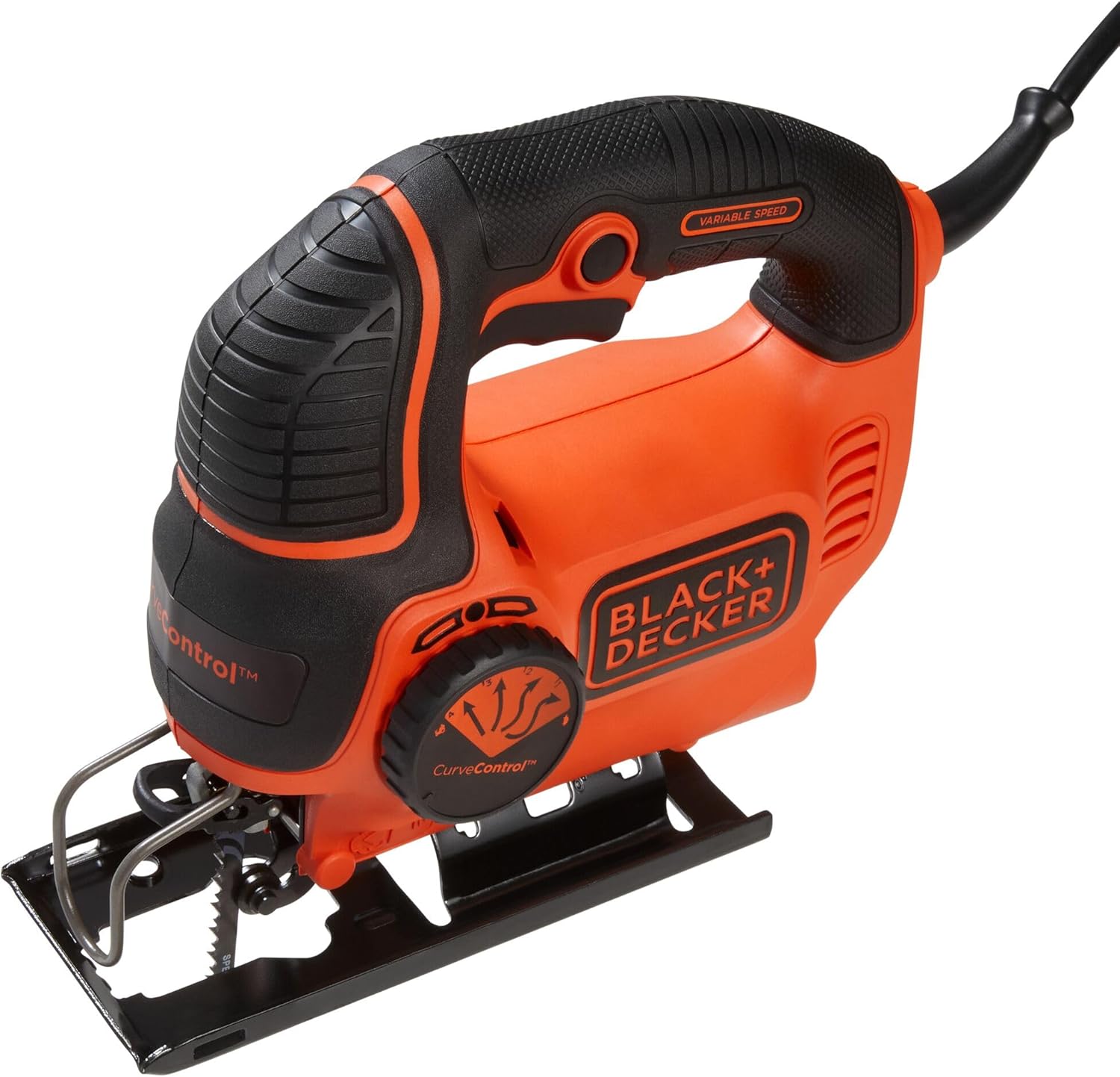 |
BLACK+DECKER Jig Saw, 5-Amp | 5‑Amp Motor. Handles wood, plastic, and light metals effectively.. Up to 3,000 strokes per minute (SPM). 4 orbital settings for maximum control over rounded cuts. |
Check Price |
What to Check Before You Buy a Jigsaw
Choosing a jigsaw gets easier once you stop comparing entire spec sheets and focus on the handful of details that affect your own work. I’d start with the blade system, then look at speed control, orbital action, bevel adjustment, visibility, and how the tool fits into the rest of your workshop.
Check the blade system first
T-shank blades are common across modern jigsaws and are used by the DEWALT DCS334B, Bosch JS470E, Makita XVJ03Z, and Milwaukee 2737-20. Bosch specifically states that the JS470E does not accept U-shank blades. The SKIL JS314901 is more flexible here because its current documentation lists compatibility with both T- and U-shank blades.
Blade compatibility matters because you will probably own the saw much longer than the starter blade that comes in the box. A broad selection of wood-cutting blades lets you tune the tool for fine plywood, hardwood, softwood, laminate, tight curves, and fast rough work.
Look at the speed range, not only the maximum number
Variable speed helps you start a cut carefully and adjust the blade movement for the material and blade. Bosch lists the JS470E at 500 to 3,100 strokes per minute. Makita lists the XVJ03Z at 0 to 2,600 SPM. Milwaukee lists the 2737-20 at 0 to 3,500 SPM, while SKIL documentation lists the JS314901 at 800 to 3,200 SPM. BLACK+DECKER lists the BDEJS600C at up to 3,000 SPM.
Those figures help describe the operating range, but they do not tell you what the cut will look like. Blade tooth pattern, orbital position, feed pressure, timber thickness, grain direction, and shoe contact can change the result just as much.
Orbital settings should match the work, not stay on one position
A high orbital setting can speed up a rough cut in softwood. The same setting can create more tear-out on a finished plywood face. If a saw provides multiple orbital positions, treat them as tools for different jobs rather than as a power level that should always be maximized.
DEWALT, Bosch, Milwaukee, SKIL, and BLACK+DECKER all advertise adjustable orbital action in different forms. Makita also specifies orbital settings for the XVJ03Z. That makes all six capable of changing how aggressively the blade engages the material.
Bevel adjustment is useful, but square cuts come first
Many jigsaws can tilt the shoe to approximately 45 degrees. DEWALT goes further by listing detents at 0, 15, and 30 degrees with a positive stop at 45 degrees on the DCS334B. Bosch lists a 45-degree bevel range for the JS470E. SKIL lists tool-free base adjustment for bevel work, and BLACK+DECKER states that the BDEJS600C can make bevel cuts up to 45 degrees.
If you rarely cut bevels, do not let this feature dominate the decision. Check that the shoe feels rigid, returns accurately to square, and stays flat on the workpiece. Those qualities affect nearly every cut you make.
Think about dust and line-of-cut visibility
DEWALT includes an integrated dust blower and LED on the DCS334B. Bosch gives the JS470E a switchable dust blower. Milwaukee adds an LED, on/off blower, dust cover, and dust extraction tube. SKIL uses a dust blower switch and its Halo Light. BLACK+DECKER focuses on a wire guard intended to preserve line of sight.
These are practical details rather than decorative extras. If you frequently cut dark pencil lines on plywood or work in a dim garage, light and dust control can make it easier to stay on course without leaning your head into an unsafe viewing angle.
Consider the battery system as part of the tool
A bare cordless jigsaw can look affordable until you add a battery and charger. If you already use DEWALT 20V MAX, Makita 18V LXT, or Milwaukee M18 tools, staying with that platform can be sensible because you can share packs across the workshop.
If you own none of those systems, compare the full cost and think about future tools you may add. The right cordless platform decision can be more important than a small difference between two jigsaws.
Do not confuse cutting capacity with cut quality
Manufacturers may list generous maximum cutting depths in wood. That tells you the blade can physically pass through a certain thickness under specified conditions. It does not promise that a thick cut will be perfectly square from top to bottom.
Blade deflection becomes more important as stock gets thicker. For clean furniture work, a fresh blade, moderate feed pressure, good support, and the correct tooth design matter. If the work requires dead-straight, repeatable, thick-stock cuts, another saw may be more appropriate for that operation even if the jigsaw can technically make the cut.
DEWALT DCS334B – Cordless Control for Frequent Woodworking
The DEWALT DCS334B is a 20V MAX XR cordless jigsaw sold as a tool-only model. DEWALT specifies a brushless motor, variable-speed trigger and dial, four-position orbital action, an LED work light, integrated dust blower, T-shank blade compatibility, and an all-metal keyless shoe with bevel detents.
That combination makes it a logical fit for someone who wants cordless movement without giving up the adjustments that matter for woodworking. It can move from a workbench to built-in cabinetry, an outdoor project, or an installation job without a cord following the cut.
What the verified features mean in practice
The brushless motor is primarily about efficient cordless operation and reduced brush maintenance. For a woodworker already using DEWALT batteries, the larger practical advantage is ecosystem compatibility: the bare tool can slot into an existing set of batteries and chargers rather than creating another charging station.
The variable-speed trigger and dial give you two layers of control. You can set the general speed range and still feather the trigger while entering a cut. That is helpful when beginning an interior cut from a drilled starter hole or approaching the end of a visible curve where you want to slow down.
Four-position orbital action lets the saw move from cleaner, less aggressive cutting toward faster stock removal. For cabinet-grade plywood, I would start conservatively and increase orbital action only if the cut is too slow for the finish you need.
The all-metal shoe is also worth attention. DEWALT lists detents at 0, 15, and 30 degrees plus a positive stop at 45 degrees, so users who make repeat bevel angles have defined positions rather than relying only on visual alignment. A no-mar shoe cover is included to help protect finished surfaces from scratches.
The LED and dust blower work together around the cut line. That does not make the blade steer itself, but it reduces the amount of sawdust obscuring the mark and makes the line easier to see in dimmer spaces.
- Cordless freedom works especially well for cabinet fitting, room-to-room DIY, outdoor builds, and jobs where a cable would cross the workpiece.
- The combination of variable speed, four orbital positions, LED lighting, dust blowing, and a keyless T-shank clamp gives the user meaningful control without stopping to reach for extra tools.
- The keyless all-metal bevel shoe with positive positions is useful for users who make angled cuts more than occasionally.
- A brushless motor and compatibility with the DEWALT 20V MAX system make the tool particularly sensible for people who already own batteries in that platform.
- It is sold as a bare tool, so buyers without compatible DEWALT batteries and a charger need to include those in the real purchase cost.
- A battery adds weight to the rear of any cordless jigsaw, and larger packs can make the tool feel less nimble during detailed curves than a lighter setup.
Who It’s Best For
The DCS334B makes the most sense for regular DIY woodworkers, cabinet installers, furniture builders, and DEWALT battery owners who value cordless movement. It is especially useful if your projects move between a garage, garden, interior rooms, and installation locations.
Not Ideal For
It is less compelling if the tool will live permanently beside a workbench and you do not already own DEWALT batteries. In that situation, a good corded jigsaw can deliver the control you need without adding a battery platform to the workshop.
Bosch JS470E – A Steady Corded Saw for Bench-Based Work
The Bosch JS470E is a 7.0-amp corded top-handle jigsaw designed around consistent speed, low-vibration operation, and a solid shoe. Bosch lists a 500 to 3,100 SPM no-load speed range, four orbital-action settings, Constant Response circuitry, a die-cast aluminum footplate, a tool-free blade-change system, and an on/off dust blower.
For a workshop user who does not need cordless movement, this is the straightforward appeal: plug it in and work without battery planning. The saw accepts T-shank blades and, according to Bosch, does not accept U-shank blades.
What the verified features mean in practice
Bosch uses a speed dial to set maximum speed and an accelerator trigger to control operating speed. That arrangement is useful when you want repeatability. You can choose an upper speed limit for a material, then still ease into the cut with the trigger.
Constant Response circuitry is intended to help the saw maintain performance under load. In practical woodworking, that matters most when moving from thin sheet material into thicker hardwood or when a long cut keeps the motor working steadily.
The four orbital settings let you choose between a smoother stroke and a more aggressive one. For a visible furniture edge or tight curve, lower orbital action gives the blade less forward aggression. For rough softwood cutting, a higher setting can move faster.
The die-cast aluminum footplate provides a broad, rigid contact surface. Keeping that plate flat on the wood is a large part of making a jigsaw behave predictably, especially in thicker material where blade deflection becomes easier to provoke.
Bosch also includes a blade-ejection lever so a hot blade can be removed without gripping it directly. That is a small feature, but it is useful after a long cut when the blade has heated from friction.
- The 7.0-amp corded design gives consistent workshop power without batteries, charging, or runtime planning.
- Bosch combines variable speed, four orbital settings, Constant Response circuitry, and a low-vibration plunging design around controlled cutting rather than a single headline feature.
- The large die-cast aluminum footplate gives the saw a stable base on sheet goods and furniture parts.
- The tool-free T-shank system and blade-ejection lever simplify blade changes, especially after longer cuts.
- The cord can drag across sheet material or catch at a bench edge if cable management is poor.
- It accepts T-shank blades only, so any older U-shank blade collection will not transfer to this saw.
Who It’s Best For
The JS470E is a strong fit for woodworkers who mainly cut at a bench or in a garage and value steady corded performance. It suits plywood work, furniture parts, curves, cutouts, and repeated shop use where battery freedom is less important than predictable setup.
Not Ideal For
It is less convenient for installation work spread across several rooms, outdoor projects without easy power access, or users who strongly prefer an entirely cordless workflow.
Makita XVJ03Z – A Familiar 18V LXT Option With Straightforward Controls
The Makita XVJ03Z is an 18V LXT cordless jigsaw sold as a tool-only model. Makita lists a variable-speed motor delivering 0 to 2,600 strokes per minute, a one-inch stroke length, orbital settings, a keyless blade-change system, T-shank blade compatibility, and an LED work light.
One detail deserves to be stated clearly: Makita’s current U.S. product page identifies the XVJ03Z as discontinued. That does not mean every retailer has stopped selling remaining stock, but it does mean buyers should check current availability and think about long-term model support before choosing it over a current design.
What the verified features mean in practice
The main reason to consider the XVJ03Z is compatibility with the Makita 18V LXT system. If those batteries already live in your workshop, the bare tool can share packs with other Makita equipment and avoid another charger or battery format.
The 0 to 2,600 SPM variable-speed range is lower at the top end than some of the other models here, but maximum stroke rate is not the only route to a good woodworking cut. A sharp blade, firm shoe contact, and controlled feed matter more when the goal is an accurate curve rather than a race through scrap timber.
Makita lists three orbital settings plus straight cutting for the XVJ03 design. That gives the user the same basic choice found on other woodworking-oriented jigsaws: reduce orbital action for cleaner or tighter work, and increase it when a faster, more aggressive cut is acceptable.
The keyless blade-change system helps you switch blade types quickly. That is valuable because jigsaw performance changes dramatically with the blade. Moving from a coarse softwood blade to a fine plywood blade should be treated as part of the job setup, not as an inconvenience to avoid.
Makita also lists an LED to illuminate the work area. The closer you are working to a curved pencil line, the more useful this becomes, particularly when the saw body casts a shadow across the cut.
- It fits directly into the Makita 18V LXT battery system, which is convenient for users who already own compatible packs and chargers.
- The variable-speed trigger, orbital settings, straight-cut mode, and keyless blade change cover the adjustments most woodworkers need for everyday curves and cutouts.
- T-shank blade compatibility gives access to a wide range of modern woodworking blades.
- Its cordless form is useful for mobile project work, built-ins, and areas where a trailing cable would be awkward.
- Makita currently marks the model as discontinued, so availability and future replacement decisions deserve more attention than with an actively promoted current model.
- The tool-only format adds battery and charger cost for anyone who is not already using Makita 18V LXT equipment.
Who It’s Best For
The XVJ03Z is most sensible for existing Makita 18V LXT owners who want a familiar cordless jigsaw for general woodworking, cabinetry, shelves, cutouts, and project work that moves around the home or shop.
Not Ideal For
It is harder to recommend as the start of a brand-new battery system because the model is discontinued. A buyer entering Makita from scratch should check the current jigsaw range rather than assuming this older model is the best long-term platform choice.
Milwaukee 2737-20 – High-Speed Cordless Cutting for M18 Users
Milwaukee’s 2737-20 is an M18 FUEL D-handle cordless jigsaw built around a POWERSTATE brushless motor and REDLINK PLUS electronics. Milwaukee lists a variable-speed range of 0 to 3,500 strokes per minute, a one-inch stroke, four-position orbital cutting, T-shank blade compatibility, tool-free blade change, tool-free bevel adjustment, an LED, an on/off blower, and included dust-extraction components.
Among these six, it has the highest listed maximum stroke rate. That can help with fast cutting, but the real woodworking value is the combination of speed with control features that let you slow the tool down, change orbital action, and keep the cut line visible.
What the verified features mean in practice
The variable-speed two-finger trigger lets you control how quickly the blade is moving as you enter and follow a cut. Milwaukee also lists positive bevel stops at 0, 15, 30, and 45 degrees, which is useful if angled work appears regularly in your projects.
Four-position orbital cutting gives you a way to tune the saw for finish versus speed. A high setting can be useful in rough softwood. A low or zero orbital setting is more appropriate when you are following a tight curve or trying to reduce edge damage on visible material.
The on/off blower is particularly practical because Milwaukee also includes a dust collection tube and dust cover. With extraction attached, you may not want the blower pushing debris away from the pickup area. With no vacuum connected, turning the blower on can help expose the cut line.
The non-marring shoe cover is another woodworking-friendly detail. It is intended to reduce the chance of marking a finished surface, which matters if you are making a cut in a prefinished panel, cabinet component, or worktop.
Like the DEWALT and Makita options, the 2737-20 is a bare cordless tool in its standard configuration. The purchase makes the most financial sense when M18 batteries and a charger are already part of your setup.
- The 0 to 3,500 SPM range gives plenty of speed for aggressive cutting while the variable trigger lets the user slow down for more controlled work.
- Four orbital positions, tool-free blade changes, and tool-free bevel adjustment reduce setup friction when moving between different cuts.
- The LED, switchable blower, dust cover, and dust extraction tube give the user several ways to keep the cut line visible and manage debris.
- M18 compatibility makes it an easy addition for users who already own Milwaukee cordless tools.
- Starting from zero in the M18 system can make the real cost noticeably higher than the bare-tool price suggests.
- The combination of a powerful saw and battery can feel substantial for delicate scroll-like work where a lighter tool may be easier to steer for long periods.
Who It’s Best For
The 2737-20 suits frequent DIY users, remodelers, contractors, and woodworkers already invested in Milwaukee M18 batteries. It is a particularly strong fit for users who want cordless movement but still need fast cutting and a broad set of adjustments.
Not Ideal For
It can be more tool than an occasional hobby user needs for a few thin plywood cuts each year. Someone working at a fixed bench on light projects may get better value from a corded model without sacrificing the functions that matter for those jobs.
SKIL JS314901 – Useful Woodworking Features at a Corded Price Point
The SKIL JS314901 is a 6-amp corded jigsaw with four orbital settings, a variable-speed trigger, tool-free blade changes, tool-free bevel adjustment, a dust blower switch, and SKIL’s Halo Light. Current SKIL documentation lists a speed range of 800 to 3,200 SPM and compatibility with both T-shank and U-shank blades.
That mix makes it interesting for a first workshop jigsaw because it includes many of the adjustment features found on more expensive tools without requiring a battery platform. It is still important to keep expectations realistic: its appeal is practical DIY versatility, not premium-tool status.
What the verified features mean in practice
The four-stage orbital system lets you decide whether you want a smoother or faster cut. For visible plywood edges, reduce the orbital action and use a clean-cut blade. For rough trimming in softwood, increase the action if the finish does not need to be furniture-ready.
The two-finger variable-speed trigger provides speed control without requiring you to hold a tiny switch. SKIL also provides a lock-on function for continuous cutting, which can reduce finger fatigue during longer runs when the work and safety conditions make continuous operation appropriate.
Tool-free blade changes encourage you to use the right blade instead of leaving the same general-purpose blade installed for every project. The fact that SKIL supports both T- and U-shank blades may also be useful for someone who already owns an older mixed blade collection.
The dust blower switch and Halo Light are aimed at visibility. A bright, broad light can be more comfortable than a narrow point of illumination when you are trying to follow a curved line across pale plywood or a dark pencil mark.
SKIL lists tool-free shoe bevel adjustment up to 45 degrees. That means you can change from square to angled cuts without searching for a hex key, although I would still verify the shoe has returned firmly to square before starting the next precision cut.
- It combines four orbital settings, variable speed, tool-free blade changes, tool-free bevel adjustment, dust blowing, and work lighting in one corded tool.
- Compatibility with both T- and U-shank blades gives more flexibility than the T-shank-only systems on several other models here.
- The corded design removes battery cost and charging from the purchase, which is useful for a fixed workshop or occasional DIY setup.
- Its controls are approachable enough for newer users while still providing room to learn how speed and orbital action affect the cut.
- The cord needs active management around sheet goods, sawhorses, and bench corners.
- It does not offer the battery mobility of the DEWALT, Makita, or Milwaukee options for work spread around a property or job site.
Who It’s Best For
The JS314901 is a sensible fit for budget-aware DIY woodworkers who want more control than a very basic jigsaw provides. It works well for shelves, plywood shapes, furniture repairs, light cabinetry, craft projects, and general workshop cutting.
Not Ideal For
It is less suited to users who frequently work far from outlets or who already have a cordless system and strongly prefer to keep every saw cable-free.
BLACK+DECKER BDEJS600C – A Simple Starting Point for Light DIY Work
The BLACK+DECKER BDEJS600C is a 5-amp corded jigsaw aimed at home projects and occasional cutting. BLACK+DECKER lists a variable-speed motor up to 3,000 SPM, Curve Control with four orbit settings, an adjustable shoe, bevel capability up to 45 degrees, and a wire guard designed to keep the cut line visible.
Its role in this group is different from the premium cordless tools. This is the straightforward option for someone who needs to cut a shelf notch, shape a small plywood project, make a sink or vent opening, or handle occasional repairs without investing in a more expensive system.
What the verified features mean in practice
The four Curve Control settings adjust the saw’s orbital action. That gives a beginner a practical way to see how an aggressive setting speeds up a cut while a gentler setting can help with tighter curves and cleaner work.
The variable-speed motor gives more control than a fixed-speed tool. You can ease the blade into the workpiece instead of immediately hitting full speed, which can make the start of a cut feel less abrupt.
BLACK+DECKER uses an adjustable shoe to create a stable platform and allow bevel cuts up to 45 degrees. For occasional home projects, that provides enough flexibility for many common angled cuts without adding complicated controls.
The wire guard is intended to preserve a clear line of sight. There is no need to oversell that feature; it simply helps reduce visual obstruction around the blade area so the user can follow a marked line more easily.
- The controls are simple enough for a first-time jigsaw owner to understand without stripping away useful features such as variable speed and adjustable orbital action.
- A corded 5-amp motor is appropriate for many light home woodworking jobs without adding battery or charger expense.
- The adjustable shoe and 45-degree bevel capability make the tool more versatile than a fixed-base entry-level saw.
- Four Curve Control settings give beginners a useful introduction to how orbital action changes cutting behavior.
- It is better suited to light and occasional work than frequent demanding cuts in thick hardwood or production-style use.
- The cord reduces mobility compared with the three cordless models in this guide.
Who It’s Best For
The BDEJS600C is aimed at beginners, occasional DIY users, renters with a small tool collection, and homeowners who need a jigsaw for light repairs, basic plywood projects, simple shelving, and craft work.
Not Ideal For
It is not the strongest fit for someone who cuts thick hardwood regularly, expects refined control for frequent furniture work, or wants a jigsaw to serve as a heavily used shop tool for years of demanding projects.
How the Six Jigsaws Differ in Actual Woodworking Use
The six tools separate naturally by how and where they are likely to be used. Looking at them this way is more useful than pretending one feature makes a universal winner.
For cordless work, the battery system should guide the decision
DEWALT DCS334B, Makita XVJ03Z, and Milwaukee 2737-20 all make sense for mobile work, but they are not interchangeable purchases. If DEWALT batteries are already on your shelf, the DCS334B avoids the expense of starting over. The same logic applies to Milwaukee M18 and Makita 18V LXT.
Between DEWALT and Milwaukee, both offer brushless cordless designs, adjustable orbital action, tool-free blade changes, work lighting, and dust-management features. Milwaukee lists the higher maximum stroke rate at 3,500 SPM, while DEWALT emphasizes a compact XR design and its all-metal bevel shoe with multiple detents.
Makita’s XVJ03Z remains useful for existing LXT users, but its discontinued status changes the buying conversation. I would treat it as a compatibility-driven option rather than a model to seek out at any cost.
For a fixed shop, Bosch is the more serious corded choice
The Bosch JS470E is the corded model I would look at first for regular bench work because its 7.0-amp motor, Constant Response circuitry, four orbital settings, large die-cast footplate, and T-shank blade system are built around controlled, repeated use.
SKIL JS314901 is more budget-oriented but surprisingly well equipped. It provides four orbital settings, variable speed, lighting, dust blowing, tool-free blade changes, and tool-free bevel adjustment. For many home workshops, that is enough functionality without moving into a higher price tier.
BLACK+DECKER BDEJS600C sits at the simpler end. It keeps variable speed and four orbital positions but is aimed more clearly at occasional home projects than frequent demanding woodworking.
For clean curves, control beats maximum speed
A curve gives the blade a chance to twist if the tool is pushed too fast. The best approach is to use a sharp blade with the right tooth count, reduce orbital action for tighter turns, keep the shoe flat, and let the blade establish the curve rather than forcing the body of the saw sideways.
Bosch’s low-vibration design and stable footplate are helpful here. DEWALT and Milwaukee both provide strong cordless control with variable speed and lighting. SKIL also gives a newer user enough adjustment to learn the technique without immediately needing a more expensive tool.
For quick rough cuts, higher orbital action earns its keep
If you are cutting a rough opening, trimming softwood, or breaking down material where the edge will be hidden, a higher orbital setting can save time. Milwaukee’s high maximum stroke rate, DEWALT’s brushless cordless design, and Bosch’s powerful corded setup all have the performance headroom for this kind of work.
The trade-off is surface quality. Faster, more aggressive cutting can increase tear-out. If a plywood face will stay visible, slow down and tune the blade and orbital setting for the finish rather than trying to finish the job in the fewest seconds.
For beginners, simpler ownership can matter more than premium performance
A first jigsaw has to be easy to live with. SKIL and BLACK+DECKER avoid battery-system decisions and give the user straightforward controls. SKIL offers more workshop-oriented features, while BLACK+DECKER keeps the experience simpler for lighter use.
The cordless models can still be beginner-friendly if you already own their batteries. What I would avoid is buying an expensive bare cordless saw, battery, and charger for a single small project when a corded tool would solve the problem just as well.
How to Choose the Right Jigsaw for the Projects You Actually Build
A useful buying decision starts with the cuts you make most often, not the project you might build someday. Work through these steps before choosing between the six models.
1. List the material you cut most
If your normal projects use 1/2-inch or 3/4-inch plywood, pine boards, MDF, and thin panels, all six tools have enough basic capability for the material when paired with the correct blade. Your decision can focus more on control, mobility, and price.
If you regularly cut thicker hardwood, long curves in furniture parts, or denser material, lean toward the more robust tools and use quality blades. Bosch JS470E, DEWALT DCS334B, and Milwaukee 2737-20 make more sense for frequent demanding use than a light occasional-use saw.
2. Decide whether the cord is a real problem
Stand where you normally work and look at the outlet. If the cord can run behind the bench without crossing the workpiece, a corded saw may be completely practical. If you often cut outside, inside cabinets, on a driveway, or around installed worktops, cordless movement becomes more valuable.
Do not pay extra to solve an inconvenience you do not have. Equally, do not underestimate how irritating a cord can become if it repeatedly catches on a sheet edge during a curved cut.
3. Check which batteries you already own
If you have several DEWALT 20V MAX packs, the DCS334B becomes more attractive. If your workshop is built around M18, the Milwaukee 2737-20 is the natural cordless comparison. Makita LXT owners may still find the XVJ03Z useful where available, but should remember the model is discontinued.
If you own no compatible batteries, compare the full cordless setup cost against Bosch, SKIL, and BLACK+DECKER rather than comparing bare-tool prices.
4. Choose the blade system you want to live with
T-shank blades are widely available and are the normal choice for the DEWALT, Bosch, Makita, and Milwaukee tools here. SKIL accepts both T- and U-shank blades. If you already own a collection of U-shank blades, that extra compatibility may matter, though I would still buy new blades based on the work rather than let an old blade collection dictate the entire tool purchase.
5. Match orbital action to your finish expectations
If your projects are mostly decorative curves, cabinet parts, or visible plywood, orbital adjustment matters because you will often want a low or zero setting. If you mainly rough out openings, higher orbital action becomes more useful.
All six offer some form of adjustable orbital behavior, so the decision is less about whether the feature exists and more about how easy the controls feel to use consistently.
6. Think about the cuts that happen after the first month
A tool often gets bought for one job and then becomes part of the workshop. Consider whether you are likely to build furniture, make cabinetry, cut laminate worktops, create templates, or take on room renovations later.
If the saw will become a regular workshop tool, better speed control, a stable shoe, easy blade changes, and comfortable handling are worth paying for. If it will spend most of the year on a shelf, simpler ownership can be the smarter decision.
Getting Cleaner Cuts From Any of These Jigsaws
A premium jigsaw with the wrong blade can leave a worse edge than a modest saw fitted with the right blade and guided carefully. Technique is not a substitute for tool quality, but it determines how much of the tool’s potential you actually use.
1. Choose the blade for the finish you need
Use a clean-cut or fine-tooth wood blade when the visible edge matters. For fast rough work, a coarser blade removes material quicker. For tight curves, a narrower blade can turn more easily, though narrow blades also require careful control to avoid twisting.
Check the blade packaging for material thickness and intended cut quality. Then install it fully into the clamp and confirm it is locked before powering the saw.
2. Mark the line clearly and choose the visible face
A thin pencil line is easier to follow than a wide marker stripe. If the workpiece has one face that matters more, plan the blade orientation and blade type around that surface because tear-out can be more visible on one side of the cut.
Painter’s tape can help with marking on dark or prefinished surfaces, but it is not magic tear-out protection. The blade and feed technique still matter more.
3. Support the workpiece without trapping the blade
Clamp the material so it cannot bounce, but keep the cut path clear underneath. If the offcut closes on the blade near the end of the cut, the saw can bind or jerk.
For a large sheet, use multiple supports so the piece stays flat. Before starting, mentally trace the entire blade path and make sure no sawhorse, clamp, bench rail, or hidden screw sits below it.
4. Start with the shoe flat
Place the front of the shoe on the workpiece before the blade contacts the wood unless you are using a manufacturer-approved plunge technique. Start the motor, let the blade reach the speed you want, and then guide it into the cut.
Keep the shoe in contact with the surface. Lifting the rear of the saw or twisting the body to force a curve makes blade deflection more likely.
5. Let the blade set the pace
A jigsaw should be guided, not shoved. If the cut slows, the instinct is often to push harder. That bends the blade, increases heat, and can make the bottom of the cut wander away from the pencil line.
Ease the feed pressure instead. If the saw still feels slow, check the blade sharpness, tooth pattern, speed setting, and orbital position before blaming the motor.
6. Back off orbital action for the final-quality cut
High orbital action is useful for speed, but a finished edge usually benefits from a calmer setting. On plywood, laminate, and visible furniture parts, start low. Make a test cut in scrap from the same material and increase the setting only if you can do so without damaging the edge.
Then use the same blade, speed, orbital position, and feed pressure on the final part. Repeatable setup is far more useful than adjusting randomly halfway through the project.
7. Use a guide for straight cuts, but know the limit
A straightedge guide can help a jigsaw follow a long line. Clamp the guide firmly and verify the offset between the blade and the edge of the shoe before cutting the real piece.
Even with a guide, the narrow blade can deflect in thick stock. If a long straight edge must be highly accurate and square through the full thickness, a circular saw, track saw, or table saw is usually the better tool for that operation.
Care That Keeps a Jigsaw Cutting Smoothly
Jigsaws do not need complicated care, but sawdust is abrasive and tends to collect around the blade clamp, guide roller, shoe, vents, and adjustment mechanisms. A few minutes of basic upkeep makes controls easier to use and helps you notice wear before it affects a project.
Unplug the cord or remove the battery before cleaning
This should be automatic. Corded models need to be disconnected from power; cordless models should have the battery removed. Do not clean around the blade clamp with the tool energized.
Let a hot blade cool before removal. Bosch provides a blade-ejection lever on the JS470E specifically so users can release a hot T-shank blade without grabbing it directly, but the blade can still land somewhere unsafe if you eject it carelessly.
Brush dust away rather than forcing it deeper
Use a soft brush or clean dry air at sensible pressure to remove loose dust around the shoe, blade guide, and housing. Avoid deliberately blasting debris deeper into vents or bearings.
Wipe the shoe clean before cutting a finished surface. A single trapped chip under the base can scratch a prefinished panel even if the saw includes a non-marring cover.
Inspect the blade guide and shoe
If cuts suddenly become harder to keep square, do not assume your technique changed overnight. Check the blade for wear or bending, confirm the shoe is locked firmly at 90 degrees, and inspect the blade guide area for damage or debris.
A worn or bent blade is cheap to replace and can make a large difference. Keeping a small selection of fresh blades organized by purpose is one of the simplest ways to improve jigsaw results.
Store blades where the teeth are protected
Loose blades thrown into a drawer can chip teeth, bend, or become difficult to identify. Keep them in labeled sleeves or a small organizer by material and tooth style.
That also makes it easier to select the right blade instead of using the one that happens to be installed. I’d rather spend thirty seconds changing a blade than spend twenty minutes sanding a torn plywood edge that the wrong blade created.
Take care of cordless batteries separately
For the DEWALT, Makita, and Milwaukee saws, battery care is part of tool care. Use compatible chargers, keep contacts clean and dry, and store packs according to the battery manufacturer’s guidance.
If a pack is damaged, swollen, cracked, unusually hot, or behaving abnormally, stop using it and follow the manufacturer’s service or disposal guidance. Do not treat lithium-ion battery damage like a cosmetic issue.
Cutting Habits That Make Good Jigsaws Look Bad
A rough result is not always evidence that the saw is poor. Several common habits create wandering blades, chipped edges, and frustrating curves even with capable tools.
Forcing the saw through thick wood
Pushing harder feels as though it should make the cut faster. In reality, it can bend the narrow blade backward or sideways and leave the bottom edge far from the line on top.
Guide the saw with steady pressure and let the blade clear its own kerf. If progress is unusually slow, a fresh blade or more suitable tooth pattern is usually a better fix than more force.
Leaving the orbital control on its most aggressive setting
A high orbital setting is satisfying in scrap wood because chips fly and the cut moves quickly. On a finished plywood face, that same aggression can leave a rough edge.
Set the orbital action for the job. Cleaner cuts and tight curves generally want less; fast rough cuts can use more.
Starting with a dull general-purpose blade
The blade is a consumable. It should be replaced before it is visibly destroyed. Dull teeth increase heat and feed pressure, which makes deflection more likely.
Keep different blades for clean plywood, general wood, tight curves, and other materials. A jigsaw becomes much more versatile once blade choice is treated as part of the setup.
Turning the body of the saw instead of following the curve
On a tight curve, beginners often twist the whole tool sideways to make the blade change direction instantly. The blade then bends in the kerf and the lower part of the cut can drift.
Use a narrower blade for tighter radii, slow the feed, reduce orbital action, and steer gradually. If the curve is tighter than the blade can comfortably follow, redesign the cut or use another method rather than forcing it.
Letting the shoe lift away from the workpiece
The shoe is the reference surface that keeps the tool stable. If you lift the saw while turning or entering a cut, you lose that reference and increase vibration.
Keep the base flat whenever the cut allows it. Clamp the work securely so you can concentrate on guiding the saw instead of holding the wood down with your free hand.
Forgetting what is underneath the workpiece
A jigsaw blade extends below the material. Cutting into a sawhorse, bench, hidden fastener, or clamp is more than an embarrassing workshop moment; it can damage the blade and create a safety hazard.
Trace the full path before pressing the trigger. This is especially important on sink cutouts and interior openings where the workpiece may be supported in several places.
Expecting a jigsaw to replace every other saw
A jigsaw is excellent for curves, cutouts, notches, and flexible shaping. It can make straight cuts with a guide, but that does not make it the first choice for long precision ripping or repeated square crosscuts.
Use the tool where its narrow blade and maneuverability are advantages. Good woodworking is often less about owning one tool that does everything and more about choosing the right tool for each operation.
Safety Notes for Jigsaw Woodworking
Wear eye protection whenever the saw is cutting. Chips and sawdust can move unpredictably, especially when using more aggressive orbital action. Hearing protection is also sensible during repeated or extended use.
Keep fingers away from the blade path above and below the workpiece. The underside is easy to forget because you cannot see it while cutting. Clamp the material rather than holding small pieces close to the blade.
Disconnect the power source before changing a blade, clearing a jam, adjusting the shoe, or inspecting the blade guide. On cordless models, remove the battery. On corded models, unplug the tool rather than relying on the trigger being released.
Do not start the saw with the blade already pressed hard against the wood unless the manufacturer’s procedure specifically calls for that setup. Let the blade move freely, then guide it into the cut with the shoe supported.
Check the blade is suitable for the material. A wood blade is not automatically appropriate for metal, plastic, laminate, or composite sheet. The wrong blade can overheat, break, or produce a poor cut.
Finally, manage dust appropriately. Wood dust can irritate the respiratory system, and some wood species or manufactured panels require more careful exposure control. Use extraction where practical and wear suitable respiratory protection for the material and task.
Frequently Asked Questions About the Best Jigsaw for Woodworking
Which of these jigsaws makes the most sense for a fixed workshop?
The Bosch JS470E is the strongest fit for frequent corded bench work because it combines a 7.0-amp motor, variable speed, four orbital settings, a large die-cast footplate, and a T-shank blade system. The SKIL JS314901 is the more budget-focused corded option with a surprisingly broad feature set.
Which model is easiest to justify if I already own cordless batteries?
Stay within the battery system you already use unless another model solves a specific problem. DEWALT 20V MAX owners can look at the DCS334B, Milwaukee M18 owners at the 2737-20, and Makita 18V LXT owners may consider the XVJ03Z where it is still available. Makita currently marks the XVJ03Z as discontinued, so availability should be checked before relying on it as a long-term purchase.
Do I need the highest strokes-per-minute number for clean cuts?
No. A high maximum speed can help with fast cutting, but a clean woodworking edge depends on blade choice, orbital setting, feed pressure, shoe stability, and material support. Slow down when the blade begins to wander or the edge quality starts to deteriorate.
Are T-shank blades better for these tools?
T-shank blades are the normal choice for most of the six models and are widely available in woodworking tooth patterns. Bosch JS470E accepts T-shank blades only, while SKIL JS314901 supports both T- and U-shank types. Choose the blade by material and finish requirement rather than shank style alone once compatibility is confirmed.
Can a jigsaw make straight furniture cuts?
It can make a straight cut, especially with a guide, but a jigsaw blade can deflect in thick material. For long edges that must be highly straight and square through the full thickness, a track saw, circular saw with a guide, or table saw is usually easier to control.
What orbital setting should I use for plywood?
Start at zero or a low orbital setting if the visible edge needs to stay clean. Use a fine or clean-cut blade and make a test cut in scrap from the same sheet. Increase orbital action only if you need more speed and the resulting edge quality remains acceptable.
Is the BLACK+DECKER BDEJS600C enough for a beginner?
For light home projects, basic plywood work, shelving, small cutouts, and occasional repairs, it can be a reasonable starting tool. A beginner who expects to build furniture frequently or cut thicker hardwood may grow into the Bosch, DEWALT, Milwaukee, or SKIL options more comfortably.
Why does my jigsaw cut look square on top but angled underneath?
That is usually blade deflection. It can happen when the blade is dull, too narrow for the job, pushed too hard, or turning through stock that is thick for the blade. Use a suitable fresh blade, slow the feed, keep the shoe flat, and avoid forcing the tool sideways through curves.
Choosing the Best Jigsaw for Woodworking Without Overbuying
The best jigsaw for woodworking is the one that gives you enough control for the cuts you actually make and fits naturally into the way your workshop runs. DEWALT DCS334B and Milwaukee 2737-20 make the strongest sense for users already invested in their cordless systems. Makita XVJ03Z can still be practical for existing LXT owners where stock remains, but its discontinued status is important to know before buying.
For corded work, Bosch JS470E is the more workshop-focused choice, while SKIL JS314901 offers a broad set of useful controls at a more accessible level. BLACK+DECKER BDEJS600C is the simpler route for occasional home projects where premium features and heavy-use durability are not the priority.
Whichever model fits, use a blade designed for the material, keep the shoe flat, and reduce orbital action for cleaner edges. Then compare the exact current tool configuration against your batteries, workspace, and expected use before ordering.