A CNC router can turn a sheet of plywood, a hardwood blank, or a small offcut into something repeatable and precise, but the machine only feels “smart” after the setup is right. The wrong work area can force you to split a simple sign into several jobs. A light frame can make a strong spindle chatter. A powerful machine can still frustrate you if clamping, dust control, software, or zeroing are treated as afterthoughts.
That is why I’d choose a woodworking CNC by starting with the projects you actually want to make, not the biggest motor number on the page. A small 3018 machine can be a sensible place to learn engraving and toolpaths.
A 400 mm-class router gives much more room for signs, trays, panels, templates, and decorative work. Heavier machines with closed-loop motors, ball screws, or higher-power routers make more sense once repeatability and deeper material removal matter more than keeping the setup compact.
I don’t assume that a specification automatically makes a machine right for every woodworker. The useful question is what that specification changes at the bench: project size, rigidity, cut strategy, setup time, upgrade room, or day-to-day confidence. A machine that matches those needs is easier to learn and less likely to feel undersized after only a few projects.
What Actually Makes a CNC Router Useful for Woodworking
Working area decides what can stay in one setup
The advertised work area is one of the first numbers I would write down. It tells you how far the machine can travel while cutting, not how large the whole frame is. A compact 3018-style router is genuinely useful for engraving tags, ornaments, coasters, small plaques, practice pieces, and detailed parts. It becomes restrictive when the project is a wide sign, cabinet insert, serving tray, furniture template, or larger decorative panel.
A work area around 400 x 400 mm changes the feel of the machine. It is still a desktop format, but many practical home projects can fit without tiling the toolpath or repositioning the workpiece. That saves time and reduces the chance of visible alignment errors between operations.
Z travel matters too. A machine may have enough X and Y room for a tray while still feeling cramped vertically once you add a spoilboard, clamps, a thick hardwood blank, and a longer bit. More Z clearance is especially useful for relief carving, thicker stock, and setups that need extra space above the workpiece.
Frame stiffness matters as much as spindle power
A CNC router cuts by pushing a rotating tool through material while the motion system tries to hold a programmed path. If the gantry, rails, spindle mount, or workholding flexes, the bit can move away from that ideal path. The result may be chatter, fuzzy edges, inconsistent depth, rough curves, or dimensions that drift from the design.
This is why a higher-wattage spindle should never be judged in isolation. A light machine may need shallow passes even if the motor sounds capable of more. A heavier structure with better guides and a rigid spindle mount can make power easier to use because the rest of the machine is better able to resist cutting forces.
For woodworking, rigidity also affects how forgiving the machine feels. Soft pine and MDF are easier on a desktop CNC than dense hardwood. Larger-diameter bits and deeper cuts create more load. If you plan to remove material quickly rather than mostly engrave, the structure deserves as much attention as the spindle label.
Leadscrews, ball screws, rails, and closed-loop motors change motion quality
Most desktop CNC routers in this group use some form of screw-driven motion. A leadscrew converts motor rotation into linear travel and is common because it is simple and cost-effective. Ball screws use recirculating bearings and are designed to reduce friction and backlash, which is one reason they appear on more serious machines.
Closed-loop stepper motors add feedback so the system can detect and correct position error rather than simply assuming every commanded step happened. That does not make bad feeds, loose workholding, or a dull bit disappear, but it can improve confidence in motion control during longer or more demanding jobs.
Linear rails and supported guides also help control side-to-side play. Their value becomes more obvious as the spindle gets stronger or the gantry moves faster. For a beginner doing shallow engraving, the difference may feel subtle. For repeated cuts, denser wood, and longer jobs, the motion system becomes a larger part of the buying decision.
The spindle defines how aggressively you can approach material removal
Small stock spindles are useful for engraving, light pocketing, and learning. They keep the machine compact and easier to power, but they are not intended to behave like a full-size trim router. More powerful spindles or compact routers give you more headroom for larger bits and heavier cuts, provided the frame and workholding can support them.
RPM matters alongside wattage. Wood often cuts cleanly at high spindle speed, but the correct setting depends on the bit diameter, number of flutes, feed rate, depth of cut, and wood species. Running a tool very fast while feeding too slowly can create heat and burn marks. Pushing too quickly can overload the bit or machine. Good CNC work comes from balancing those variables rather than maximizing one of them.
Workholding is part of accuracy
A machine can have accurate rails and still produce a poor result if the board moves. Clamps need to hold the work securely without entering the toolpath. Thin stock may bow. Uneven material can sit high in one corner. A spoilboard can be surfaced so the cutting plane is more consistent, but that still depends on the frame and bed being set up correctly.
For signs, pockets, and shallow carving, the effect of workholding is easy to underestimate because the job may start well. Then the bit reaches a stressed area of the board, the piece shifts slightly, and the final contour no longer lines up with the earlier toolpath. Planning clamps before generating the job is much easier than trying to rescue the piece halfway through.
Software is where the project becomes a toolpath
A CNC router does not understand a drawing in the same way you do. You create or import a design, convert that design into toolpaths in CAM software, generate G-code, then use control software to send those instructions to the machine. GRBL-based routers are popular partly because a wide range of control programs and learning resources exist around that workflow.
The important beginner skill is not memorizing every software feature. It is learning the sequence: define the stock, choose the tool, set cutting parameters, decide where zero will be, preview the toolpath, secure the material, set the machine zero, and run a safe test. Once that sequence becomes familiar, changing software is far less intimidating.
| Product Image | Product Name | Features | Price |
|---|---|---|---|
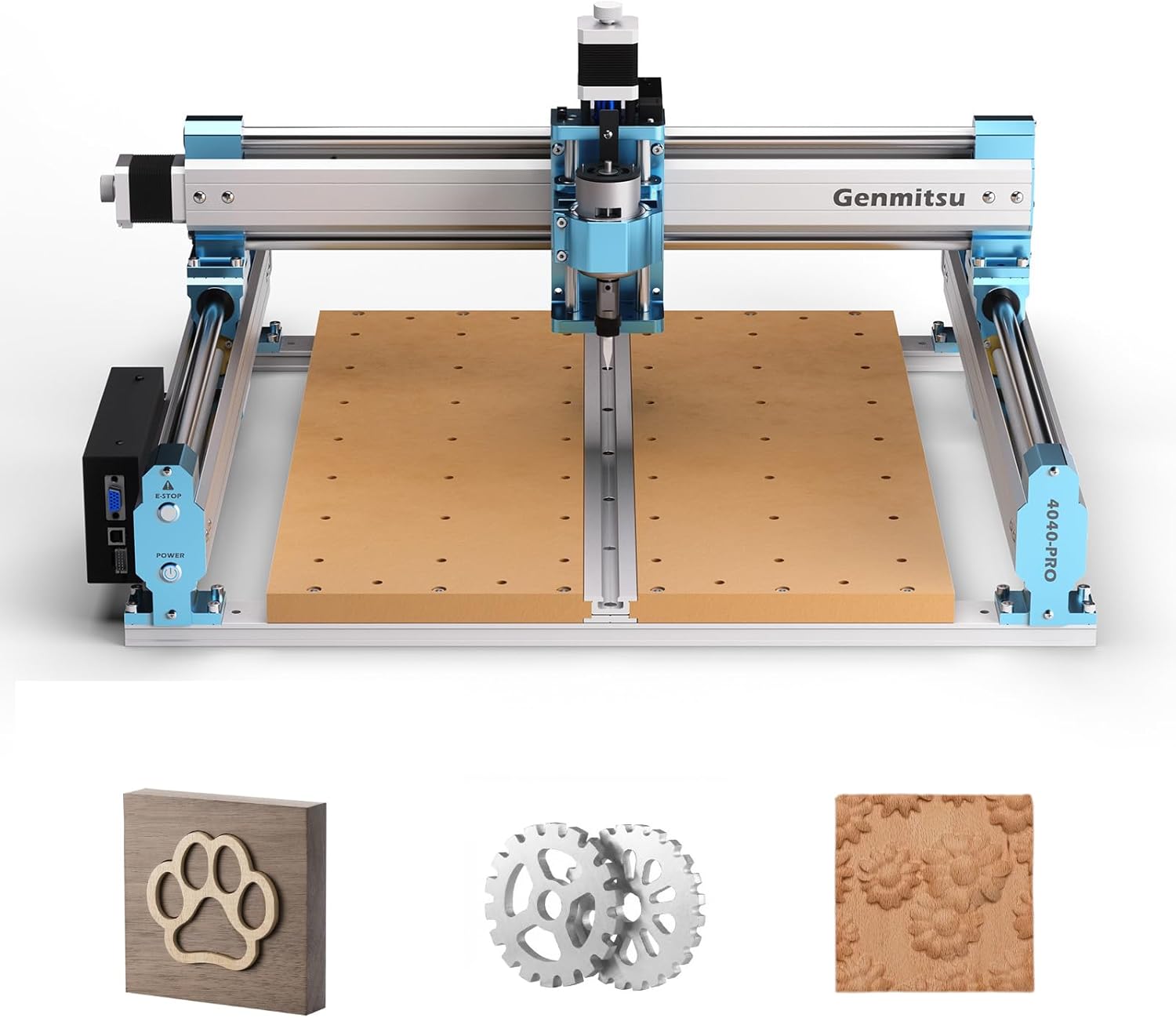 |
Genmitsu 4040-PRO | A balanced CNC router for woodworking. More workspace than a 3018 machine. A strong beginner-to-hobbyist option. A machine for signs, engraving, acrylic, MDF, and light carving. |
Check Price |
 |
Genmitsu 3018-PROVer V2 | Beginner’s Friendly. Easy to Assemble. Useful for both simple and complex tasks. |
Check Price |
 |
FoxAlien Masuter Pro | Aluminum Structure Body. Detailed cutting and engraving. Budget-friendly. |
Check Price |
 |
Genmitsu PROVerXL 4030 V2 | NEMA 23 closed-loop stepper motor. Stronger movement. Easy to use and assemble |
Check Price |
 |
Genmitsu 4040-PRO MAX | Integrated T-Track. 65mm spindle mount and 52mm spacer for easy router. 710W Trimmer |
Check Price |
 |
FoxAlien Masuter 3S CNC Router | 60° engraving capabilities. 400W Spindle. Stepper motor. Easy to assemble and use |
Check Price |
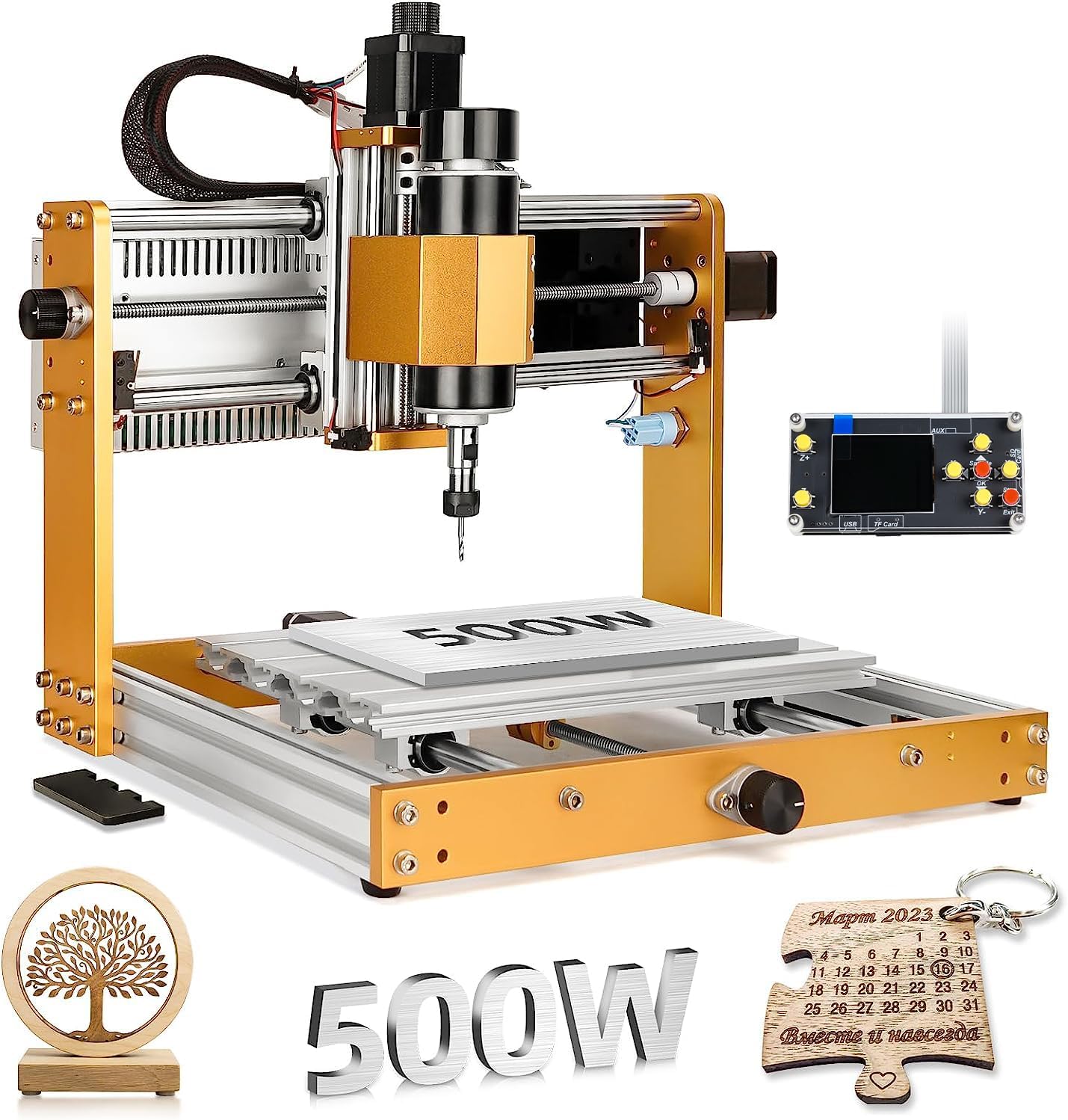 |
LUNYEE 3018 PRO MAX CNC Router | Powerful Spindle. Durable. Longest Z-axis Stroke. 3 Axis limit switches & emergency button. |
Check Price |
What to Check Before You Buy a CNC Router for Woodworking
Match the bed size to projects you can name today
Write down several real projects and their rough dimensions. If most are small engraved pieces, a 3018 machine can make sense. If the list includes 14-inch signs, trays, cabinet details, or wider templates, moving to a 400 mm-class bed can save you from immediately wanting a larger machine.
I know it is tempting to buy the smallest machine because it takes less space, but floor or bench space is only one form of cost. Constantly splitting toolpaths, repositioning stock, or redesigning projects around a tiny bed also has a cost in time and frustration.
Look at usable Z space after the whole setup is assembled
Do not read Z travel as if the entire distance is available above every workpiece. The spoilboard, clamps, bit length, collet position, and spindle mount all affect usable clearance. If you want to carve thick stock or deep reliefs, a taller Z envelope gives you more flexibility.
Extra vertical travel is not always an advantage for delicate engraving, because a taller moving assembly can add leverage if the structure is not rigid. The useful design is the one that provides enough clearance without making the cutting head feel loose.
Decide how much spindle power your work really needs
A beginner engraving softwood does not automatically need a 500W or 710W spindle. A small spindle can teach feeds, speeds, workholding, zeroing, and toolpath planning very effectively. Higher power becomes more useful when you want faster material removal, larger tools, denser stock, or a broader range of projects.
The machine should be evaluated as a system. A strong spindle on a flexible frame can simply reveal the frame’s limits sooner. A modest spindle on a rigid machine can produce clean work if the cuts are planned sensibly.
Check spindle-mount flexibility before assuming an upgrade is easy
Some machines include multiple spindle clamps or support alternative mount diameters. That can be valuable if you expect to move from a small included spindle to a stronger router later. It can also affect dust-shoe compatibility and the accessories you can use.
An upgrade still needs electrical, mechanical, and control compatibility. Do not assume that a mount physically fitting means the controller can power the motor, or that the frame can use the extra power effectively. Treat the mount as one part of the upgrade path, not the whole path.
Safety controls deserve a place near the top of the checklist
An emergency-stop button is useful because CNC motion can go wrong quickly if the origin, toolpath, or dimensions are incorrect. Limit switches help the machine know its travel boundaries and support homing. A Z probe can make tool setting more repeatable when used correctly.
These features do not replace supervision. A clamp can still loosen, a bit can break, dust can build up, and a program can contain an error. The goal is to layer sensible controls rather than rely on one safety feature.
Think about dust before the first sheet of MDF
Wood CNC work creates chips and fine dust around the spindle, rails, screws, electronics, and the rest of the room. MDF is especially messy. A dust shoe and suitable extraction can make the machine easier to live with and can help keep chips away from moving parts.
Leave enough space around the router for the hose to move without catching on the gantry. Dust collection should not pull the Z-axis sideways or restrict travel. It is better to solve this during setup than after the first long carving job fills the workshop with powder.
Genmitsu 4040-PRO – A Practical 400 x 400 mm Platform for Growing Woodworking Projects
The Genmitsu 4040-PRO sits in a useful middle ground between tiny learning machines and heavier desktop routers. SainSmart currently lists a 400 x 400 x 78 mm working area, an all-aluminum frame, lead-screw drive, a 75W stock spindle, GRBL control, limit switches, an emergency-stop button, and an LED Z probe. It also uses a reinforced MDF platform with T-tracks and supports spindle-mount changes beyond the stock setup.
That work area is the main reason this machine makes sense for woodworkers rather than only engravers. A roughly 15.75-inch square cutting envelope can handle many signs, plaques, trays, small panels, templates, and décor pieces without forcing you to tile the job. It is large enough to feel useful but still small enough to live on a sturdy bench.
The 75W spindle sets realistic expectations. It is suited to engraving and lighter cutting rather than aggressive hardwood removal. SainSmart also offers larger spindle-mount options for the platform, so the machine has an upgrade path, but the stock configuration is best treated as a measured woodworking setup rather than a miniature production router.
Key features translated into practical benefits
The 400 x 400 mm work area gives you room to learn on projects that feel finished rather than merely experimental. A small sign, decorative panel, catch-all tray, inlay pocket, or routing template can often stay in one coordinate system. That reduces the need for indexing and makes early CNC work easier to reason about.
The all-aluminum frame and lead-screw drive matter because they give the machine a more substantial base than very light acrylic-framed routers. That does not mean you can ignore conservative cutting parameters, but a stiffer structure is a better starting point for cleaner edges and repeatable depth.
The reinforced MDF T-track platform makes workholding more adaptable. T-tracks give clamps repeatable attachment points while the MDF surface can function as a sacrificial layer. Once the spoilboard is surfaced and the clamping pattern is familiar, repeat jobs become less awkward.
Limit switches, emergency stop, and the LED Z probe support a more organized workflow. Homing gives the machine a known reference, the probe can help establish tool height, and the emergency stop gives you a direct way to interrupt a bad situation. These are not glamorous features, but they are the sort of features that make a CNC easier to trust as you learn.
The spindle-mount system leaves room to change the cutting setup later. SainSmart currently lists 42 mm and 52 mm stock compatibility and optional larger mounts. That makes the 4040-PRO more interesting for someone who expects their needs to grow, although every spindle change should still be checked for weight, power, and controller compatibility.
- The 400 x 400 mm work area is large enough for many practical woodworking projects without giving the machine an oversized workshop footprint.
- The all-aluminum frame, lead-screw motion, limit switches, emergency stop, and Z probe make the stock platform feel more complete than a bare-bones learning kit.
- The reinforced T-track MDF bed is convenient for clamping and gives you a spoilboard surface that can be resurfaced as your setup evolves.
- Spindle-mount upgrade options give the machine a clearer growth path than a router that locks you into one small motor size.
- The included 75W spindle is better suited to engraving and lighter cutting than fast, deep hardwood removal.
- A 400 mm square work area is useful for hobby furniture parts and signs, but full cabinet panels and larger furniture components still require indexing or a bigger machine.
Who It’s Best For
This is a sensible fit for a beginner or intermediate hobbyist who already knows that a tiny 3018 bed will feel restrictive. It suits signs, trays, templates, decorative panels, MDF work, and moderate-size carving where workspace matters more than maximum stock spindle power.
Not Ideal For
It is not the strongest choice if your main goal is aggressive hardwood machining from day one or if most of your planned work is larger than roughly 400 mm in either X or Y. In those cases, the stock spindle and desktop work envelope may become the limiting factors quickly.
Genmitsu 3018-PROVer V2 – A Compact Learning Machine for Small Carving and Engraving
The Genmitsu 3018-PROVer V2 is a compact CNC built around a 290 x 180 x 40 mm working area. SainSmart lists an all-aluminum frame, 32-bit control board, home and limit switches, emergency stop, Z probe, lead-screw motion, and a 75W spindle. The machine arrives partly assembled, and its small footprint makes it easier to fit into a shared workshop or hobby room.
The key word here is compact. A 3018 machine is not trying to replace a larger woodworking router. Its strength is giving you a controlled way to learn toolpaths, feeds, speeds, zeroing, engraving bits, and workholding on smaller material. That is valuable because CNC has a software-and-process learning curve as well as a mechanical one.
For woodworkers, this model makes the most sense when the projects are intentionally small. Think ornaments, small nameplates, coasters, tags, detailed relief samples, inlay tests, tiny templates, and engraving on pre-cut blanks. The machine can work on wood, but its bed size should shape expectations before you buy it.
Key features translated into practical benefits
The 290 x 180 mm work area keeps the overall machine manageable. If you do not have a dedicated shop, that smaller footprint can matter more than raw project capacity. A compact CNC is easier to place on a sturdy bench, enclose, or move when the space has to serve other purposes.
The 32-bit controller, limit switches, emergency stop, and Z probe make the V2 more structured for learning than an extremely basic CNC kit. Homing and probing encourage repeatable habits, while the emergency stop provides a direct control if the program or setup goes wrong.
The 75W spindle is appropriately modest for the machine. It is useful for engraving and shallow cutting with small tools. That can actually be helpful while learning because it encourages conservative toolpaths instead of inviting aggressive passes that the compact structure is not designed to absorb.
The aluminum frame gives the machine a stronger foundation than plastic-heavy entry-level designs, but the X-Z assembly still includes plastic components according to SainSmart’s current comparison data. That is a reminder to keep the machine within its intended scale rather than treating “all-aluminum frame” as a promise of heavy industrial stiffness everywhere.
The PROVer V2 also supports laser-module switching and includes ports intended for related accessories. That may appeal to a maker who wants one compact motion platform for different small projects, although laser work brings a different set of ventilation and eye-safety requirements.
- The small footprint is easy to accommodate in a home workshop, craft room, or shared bench area.
- Home switches, limit switches, emergency stop, and a Z probe give beginners useful tools for learning a repeatable CNC routine.
- The 32-bit control board and GRBL ecosystem provide a familiar path into widely used desktop CNC software workflows.
- The lower-power spindle and small work area encourage manageable projects where a beginner can learn without wasting large pieces of material.
- The 290 x 180 mm work area becomes restrictive quickly if you want to make larger signs, trays, or furniture components.
- The 75W spindle and compact structure are not intended for heavy material removal or production-style hardwood cutting.
Who It’s Best For
This machine is best for someone who wants to learn CNC fundamentals on small pieces and values a compact, relatively approachable setup. It also suits experienced makers who want a small secondary machine for engraving, test cuts, jigs, or tiny repeat parts.
Not Ideal For
It is not a good fit if your project list already includes wide signs, cabinet components, large templates, or thick hardwood stock. Buying small only makes sense when the work itself is small.
FoxAlien Masuter Pro – A 400 mm Work Area With Flexible Spindle-Mount Options
The FoxAlien Masuter Pro uses a 400 x 400 x 60 mm active work area and an all-aluminum structure. FoxAlien lists a linear-rail Z-axis, a stock 775 spindle rated at 10,000 RPM, a controller box with accessible emergency-stop and home controls, and included 52 mm and 65 mm spindle clamps. The company also describes much of the machine as preassembled, with the remaining setup designed to be relatively short.
For woodworking, the interesting part is not that the machine is simply “another 4040.” The combination of a square work area and multiple spindle clamps gives it a flexible identity. You can start with the included spindle for lighter work, then consider a different motor or compact router later if the rest of your workflow justifies it.
The Masuter Pro also includes hand-adjustment knobs on the stepper motors and a small work light on the Z-axis. Those details do not change cutting power, but they can make setup and inspection more convenient when you are positioning the spindle, checking clearance, or preparing a job.
Key features translated into practical benefits
The 400 x 400 mm cutting area is large enough for signs, plaques, templates, serving-board details, decorative panels, and many small furniture accents. It is a significant jump from a 3018 bed without moving into a much larger floor-standing format.
The linear-rail Z-axis is important because the cutting head is where spindle weight and cutting forces meet. Better guidance at the Z-axis can reduce unwanted movement, especially if you later move beyond the light stock spindle.
The included 52 mm and 65 mm clamps make the machine easier to adapt. FoxAlien specifically positions the larger clamp for compatible router upgrades. That is useful if you want to grow into stronger cutting without replacing the whole frame, but heavier spindle setups still deserve conservative acceleration, depth, and feed choices.
The controller box puts the emergency-stop and home buttons where they are easy to reach. Dust-resistant packaging around electronics is also helpful in a woodworking environment because CNC-generated chips travel farther than you expect.
The machine’s partly preassembled design reduces the amount of mechanical construction required before calibration. That does not remove the need to square the machine, check fasteners, inspect cable routing, and surface the spoilboard, but it can make the first setup less overwhelming.
- The 400 x 400 mm work area offers useful woodworking capacity without requiring a very large bench.
- The all-aluminum frame and linear Z-axis give the machine a solid base for engraving and moderate cutting work.
- Included 52 mm and 65 mm spindle clamps give you more flexibility if you plan to change the cutting motor later.
- The accessible controller, work light, and hand-adjustment knobs are thoughtful setup features that can make everyday use less fiddly.
- The included stock spindle is still a light-duty starting point, so buyers expecting aggressive hardwood cutting may want an upgrade sooner than later.
- The 60 mm Z travel is adequate for many flat woodworking projects but less generous than the taller travel available on some of the other machines here.
Who It’s Best For
The Masuter Pro suits a hobby woodworker who wants a 400 mm bed, a metal frame, and a clear spindle-upgrade path. It is especially appealing if you prefer FoxAlien’s platform and expect to experiment with different spindle sizes over time.
Not Ideal For
It is less suitable if you want maximum Z clearance or a high-power spindle included from the start. The value of this machine is in the platform and upgrade flexibility, not in pretending the stock motor is a heavy cutting solution.
Genmitsu PROVerXL 4030 V2 – Closed-Loop Motors and Ball Screws for More Demanding Work
The Genmitsu PROVerXL 4030 V2 moves into a more serious desktop CNC design. SainSmart currently lists a 400 x 300 x 110 mm work area, NEMA23 76 mm closed-loop stepper motors, 1204 ball screws, a metal frame with hybrid spoilboard, GRBL 1.1h control, maximum travel speed up to 5000 mm/min, and a spindle rated up to 400W at 10,000 RPM.
Those numbers matter because they describe a machine built around stronger motion control rather than simply a larger bed. Closed-loop motors can detect position error. Ball screws reduce friction and backlash compared with more basic screw arrangements. The 110 mm Z travel gives noticeably more vertical room than many compact desktop routers.
The work area is slightly narrower in Y than a square 4040 machine, but the stronger motion platform can be more valuable if your priority is repeatability and controlled cutting rather than maximum square footage. It is a machine for someone who expects to run longer toolpaths, repeat parts, or take woodworking beyond introductory engraving.
Key features translated into practical benefits
Closed-loop NEMA23 motors are the headline mechanical upgrade. They give the control system feedback about motor position, which can reduce the risk of unnoticed step loss during demanding moves. That matters on a long job because a small position error can ruin every operation that follows it.
The 1204 ball screws support smoother, lower-friction movement and improved positional control. For woodworking, that can show up in cleaner repeated profiles, more consistent pockets, and better confidence when a part needs to fit another part rather than simply look decorative.
The 400 x 300 x 110 mm work area is useful for signs, plaques, jigs, templates, boxes, trays, inlays, instrument-related parts, and smaller furniture components. The taller Z capacity is especially helpful for thicker stock and deeper relief work, although real usable height still depends on tooling and clamping.
The maximum 400W spindle provides more cutting headroom than the 75W Genmitsu models. It can support more assertive woodworking strategies, but the same basic rules still apply: match tool diameter, chip load, feed, spindle speed, and depth of cut to the wood and the machine.
SainSmart also lists a hybrid spoilboard and a GRBL-based controller that works with common control software. This keeps the machine within a familiar desktop CNC workflow even though the mechanical hardware is a step up from beginner kits.
- Closed-loop NEMA23 motors and ball-screw motion give this machine a stronger foundation for repeatable, demanding jobs.
- The 110 mm Z travel provides useful vertical capacity for thicker stock, relief carving, and more flexible fixturing.
- The spindle is rated up to 400W, giving more woodworking headroom than the smaller stock spindles on the entry-level Genmitsu machines.
- A 400 x 300 mm bed remains compact enough for a serious home workshop while supporting many practical wood projects.
- The 300 mm Y work area is narrower than the 400 x 400 mm beds on several other machines here, so project shape matters.
- The stronger mechanical system costs you simplicity: setup, calibration, tool selection, feeds, and workholding deserve more attention because the machine is capable of applying more force.
Who It’s Best For
This model suits an intermediate hobbyist, serious maker, or small-shop user who values stronger motion hardware and repeatability. It makes sense when the CNC will be used regularly for fitted parts, templates, repeat products, or thicker work rather than occasional engraving.
Not Ideal For
It may be more machine than you need if you only want small nameplates and simple engraving. It is also not the best fit if a square 400 x 400 mm cutting area matters more to your work than the stronger ball-screw and closed-loop motion system.
Genmitsu 4040-PRO MAX – A 710W Desktop Router for Faster Material Removal
The Genmitsu 4040-PRO MAX takes the 4040 format in a more power-focused direction. SainSmart currently lists a 400 x 400 x 78 mm active work area, a reinforced all-aluminum frame, a 710W digital trimmer router with a 65 mm mount, enhanced X- and Z-axis guidance, limit switches, emergency stop, LED Z probe, GRBL control, and a reinforced MDF/T-track platform.
This is the model in the group where spindle power changes the practical conversation most clearly. A 710W router gives you more capacity for woodworking cuts than a small 75W spindle. Larger bits, stronger material removal, and denser stock become more realistic, although cut quality still depends on rigidity, toolpath strategy, bit selection, and workholding.
The working area remains roughly the same useful 4040 size as the standard 4040-PRO, so this is not a “bigger bed” upgrade. It is a stronger cutting setup in a similar desktop footprint. That distinction matters if your projects fit comfortably inside 400 mm but the stock spindle on a lighter machine would slow you down.
Key features translated into practical benefits
The included 710W digital trimmer router is the clearest advantage. It gives you more torque and speed range for woodworking than a light engraving spindle, which can shorten roughing time and make larger bits more practical. You still need sensible pass depth and chip load; more power only helps when the rest of the setup stays controlled.
SainSmart lists upgraded X- and Z-axis structures using linear guidance and screw-driven motion. Stronger support around the spindle helps the machine make better use of the router’s power because the cutting head is less dependent on a light-duty carriage.
The 400 x 400 x 78 mm work area is a useful fit for signs, trays, carved panels, furniture details, templates, jigs, and repeat products. SainSmart also describes a 100 mm material pass height, giving the frame room to accommodate thicker material even though programmed Z travel remains 78 mm.
The reinforced spoilboard uses a central aluminum support with T-tracks. That matters because a flatter, better-supported cutting surface reduces one source of depth inconsistency, especially across wide engraving or surfacing operations.
The machine also retains limit switches, an emergency stop, a Z probe, GRBL control, and compatibility with several accessories in the 4040 ecosystem. That makes it easier for someone familiar with Genmitsu’s smaller machines to move up without relearning the entire control approach.
- The included 710W router gives substantially more woodworking headroom than the small stock spindles used on lighter desktop CNCs.
- The reinforced frame, upgraded X/Z guidance, and supported T-track spoilboard are designed to make that extra cutting power more usable.
- The 400 x 400 mm work area fits a broad range of hobby woodworking projects without requiring a large-format machine.
- Limit switches, emergency stop, Z probing, and GRBL control keep the workflow familiar and practical for home-shop use.
- The stronger router creates more noise, dust, and cutting force, so extraction, workholding, and hearing protection become even more important.
- The machine is still limited to a roughly 400 mm square active area; power does not solve the size problem for full cabinet panels or large furniture parts.
Who It’s Best For
This is a strong fit for a woodworker who likes the 4040 footprint but wants much more cutting capability from the included spindle. It suits signs, trays, hardwood carving, templates, and repeat pieces where time spent removing material matters.
Not Ideal For
It is unnecessary if your work is almost entirely fine engraving on small blanks. It also will not satisfy someone whose main requirement is a substantially larger bed rather than more spindle power.
FoxAlien Masuter 3S CNC Router – Closed-Loop Motion, 400W Spindle, and Taller Z Travel
The FoxAlien Masuter 3S is a more performance-oriented machine than the Masuter Pro. FoxAlien currently lists a 400 x 400 x 95 mm working area, four NEMA23-76 closed-loop stepper motors, maximum travel speed up to 10,000 mm/min, a 400W spindle, dual HG-15 linear rails on the Z-axis, a T12 lead screw, and included 52 mm and 65 mm spindle mounts.
For woodworking, that combination gives the machine a useful balance of area, Z height, motor feedback, and spindle power. The 400 mm square bed handles many normal hobby projects, while 95 mm of Z travel offers more flexibility for thicker stock and relief work. The 400W spindle is strong enough to make real cutting projects more comfortable than they would be on a small engraving motor.
FoxAlien also positions the 65 mm mount as a path to a compatible trimmer-router upgrade. That means the 3S can be treated as a platform rather than a fixed configuration, but the stock 400W spindle is already far more capable than the standard motor on the older Masuter Pro.
Key features translated into practical benefits
Closed-loop NEMA23 motors give the motion system feedback and provide more torque than the smaller motors common on entry machines. That helps during faster travel and more demanding cuts, particularly on longer jobs where undetected position loss would be costly.
The Z-axis uses dual linear rails and a T12 lead screw. This is a sensible place to add rigidity because the Z assembly carries the spindle and responds directly to cutting force. A better-supported spindle carriage can improve edge quality and help maintain depth under load.
The 400W spindle gives you enough power to approach woodworking as more than engraving. Pockets, profiles, and relief work can be planned with greater material-removal capacity, although the correct feed and depth still depend on the bit and wood.
The 400 x 400 x 95 mm working envelope is particularly attractive for thick plaques, deeper reliefs, boxes, trays, and jobs that need taller fixtures. It gives more Z room than the standard Masuter Pro without giving up the useful square bed.
FoxAlien also lists a metal frame, MDF spoilboard, a dust-resistant controller enclosure, and support for an offline controller. These details matter for a workshop machine that may run surrounded by fine wood dust and where you may not want a computer permanently next to the cutting area.
- Closed-loop NEMA23 motors provide stronger, feedback-based motion control for longer and more demanding jobs.
- The 400W spindle is a meaningful step up from light engraving motors and suits a wider range of woodworking cuts.
- A 400 x 400 x 95 mm work area combines useful project width with generous vertical travel for a desktop machine.
- Dual linear rails on the Z-axis and a rigid frame help support the spindle during cutting and future upgrades.
- The stronger motors and spindle make this a more involved machine to set up and tune than a small learning-focused CNC.
- Even with good Z travel, the 400 mm X/Y limits still rule out full-size furniture panels unless you use indexing strategies.
Who It’s Best For
The Masuter 3S fits a serious hobbyist or small maker who wants a square 400 mm work area, closed-loop motion, and a 400W spindle without moving to a much larger machine. It is particularly appealing for repeat projects, deeper carving, and users who may upgrade the spindle later.
Not Ideal For
It is more capability than a casual engraver needs, and it still does not replace a large-format router for furniture sheets or cabinet panels. If your main priority is the smallest footprint and simplest learning curve, a 3018 model is easier to justify.
LUNYEE 3018 PRO MAX CNC Router – Compact Footprint With a 500W Spindle and 80 mm Z Travel
The LUNYEE 3018 PRO MAX takes the small 3018 footprint in a different direction from the usual light-duty beginner machine. LUNYEE currently lists a 300 x 180 x 80 mm work area, a 500W spindle, aluminum-and-carbon-steel structure, up to 5000 mm/min travel speed, a 32-bit GRBL-compatible control board, six limit switches, a dedicated emergency-stop button, Z probe, and an offline controller.
That mix is unusual because the bed is compact while the spindle and Z travel are comparatively substantial. The machine can fit small workpieces only, but within that space it offers more cutting power and vertical room than a basic 3018. That can be useful for dense small parts, deeper carving, small jigs, and experimentation with materials that would strain a light spindle.
The important limitation is obvious: power does not enlarge the bed. If the project is a 14-inch sign, the 500W spindle does not help it fit. This machine makes the most sense for someone who intentionally wants a compact cutting area but does not want a tiny motor.
Key features translated into practical benefits
The 500W spindle gives the LUNYEE far more material-removal potential than a conventional low-power 3018. On wood, that can support larger bits and more confident pocketing or profiling, as long as the cut is still matched to the compact frame and workholding.
The 300 x 180 x 80 mm work envelope is small in X and Y but generous in Z for this footprint. That creates an interesting use case for thick small parts, relief carving, and jobs where vertical clearance matters more than surface area.
The all-metal structure uses aluminum and carbon steel according to LUNYEE’s current specifications. More mass and metal structure can help the machine resist cutting forces from the stronger spindle, although a compact CNC still needs thoughtful feeds and pass depths.
Six limit switches cover positive and negative travel on the three axes, while the dedicated emergency stop adds a direct safety control. The included offline controller lets you run prepared G-code without keeping the main computer connected throughout the job, which can be convenient in a dusty workshop.
The 32-bit controller supports GRBL-based software and provides ports for related accessories. That gives the machine a familiar control environment while the hardware remains more power-focused than many 3018 kits.
- The 500W spindle gives a compact 3018-format machine unusually strong cutting capability for small woodworking parts.
- An 80 mm Z working range provides useful vertical space for thicker stock and deeper relief work.
- Six limit switches, emergency stop, Z probing, and offline control support a more complete workshop workflow.
- The aluminum-and-carbon-steel structure is designed to provide a sturdier base for the stronger spindle than a plastic-heavy compact machine would.
- The 300 x 180 mm X/Y work area remains small, so the machine is unsuitable for larger signs and broad furniture components without repositioning.
- A 500W spindle in a compact frame rewards careful cutting parameters; treating the motor rating as permission for very aggressive passes can create vibration or poor finish.
Who It’s Best For
This model suits a maker who wants to keep the machine physically compact but needs more spindle power and Z clearance than a basic 3018 offers. It is particularly interesting for small hardwood parts, reliefs, jigs, prototypes, and detailed pieces that fit the bed.
Not Ideal For
It is not the right choice if your main reason for buying a CNC is to make larger wall signs, wide trays, or furniture-scale panels. The compact X/Y envelope is the deciding limitation regardless of spindle power.
Comparing the Seven CNC Routers for Woodworking
If project size is your first concern
The Genmitsu 4040-PRO, FoxAlien Masuter Pro, Genmitsu 4040-PRO MAX, and FoxAlien Masuter 3S all give you a roughly 400 x 400 mm working area. That square format is easier to use for signs, trays, decorative panels, and templates than the narrow 3018 machines.
The PROVerXL 4030 V2 uses a 400 x 300 mm bed. You give up some Y width, but you gain the stronger ball-screw and closed-loop motion system plus generous Z travel. The Genmitsu 3018-PROVer V2 and LUNYEE 3018 PRO MAX are the compact choices. Their smaller beds make sense when the projects are genuinely small.
If spindle power matters most
The Genmitsu 4040-PRO MAX has the strongest included woodworking router in this group at 710W. The LUNYEE 3018 PRO MAX follows with a 500W spindle but uses a much smaller X/Y bed. The PROVerXL 4030 V2 and FoxAlien Masuter 3S both sit around the 400W level and pair that power with stronger motion systems than entry machines.
The standard Genmitsu 4040-PRO and 3018-PROVer V2 use 75W stock spindles, while the Masuter Pro uses a lighter 775 spindle. Those machines are better viewed as engraving and moderate-cutting platforms unless you plan a compatible spindle upgrade.
If motion hardware and repeatability matter most
The PROVerXL 4030 V2 stands out with closed-loop NEMA23 motors and 1204 ball screws. The Masuter 3S also uses closed-loop NEMA23 motors and adds dual linear rails on the Z-axis. Those features make both machines attractive for longer jobs and repeat parts where maintaining position matters.
The 4040-PRO MAX uses upgraded linear guidance around the cutting head and a reinforced bed, giving it a stronger platform for its 710W router. The lighter machines use simpler motion systems that are easier to understand but better suited to less demanding cuts.
If you want the easiest learning path
The 3018-PROVer V2 is the clearest teaching machine because its small bed and modest spindle naturally keep projects manageable. The 4040-PRO is the stronger choice if you are new but already know you want to make larger signs and trays.
The Masuter Pro also works well for a beginner who wants a 400 mm bed and spindle-mount flexibility. The PROVerXL 4030 V2, 4040-PRO MAX, Masuter 3S, and LUNYEE 3018 PRO MAX can certainly be learned by beginners, but their extra power or stronger motion systems make careful setup more important.
If upgrade flexibility matters
The Masuter Pro includes 52 mm and 65 mm spindle clamps, giving it an obvious path to different cutting motors. The Masuter 3S also includes multiple mount sizes. The Genmitsu 4040-PRO has optional larger mounts and a broad accessory ecosystem, while the 4040-PRO MAX is already supplied with a 65 mm 710W router.
The best upgrade path is the one you will actually use. Buying a machine only because it can accept a stronger spindle later makes little sense if the work area is already too small for your projects.
How to Set Up a CNC Router for Cleaner Woodworking Results
1. Choose a rigid, level bench before assembling the machine
A CNC router should not rock while the gantry changes direction. Place it on a stable bench with enough room for cables, dust extraction, and access to the emergency stop. If the bench flexes, the machine’s own rigidity cannot fully compensate.
Check that the surrounding area allows the X and Y axes to move through their complete travel without hoses or cords catching. Then decide where the computer or offline controller will sit so you can reach it without leaning over the active machine.
2. Assemble carefully, then square the frame
Follow the manufacturer’s sequence rather than tightening every bolt immediately. Bring the major sections together, check alignment, and then tighten gradually. A frame that is slightly twisted can make the gantry bind or produce cuts that are not square.
After assembly, move each axis through its travel with the machine off where the design allows safe manual movement. Look for tight spots, loose wheels, cable strain, or anything contacting the frame.
3. Check the spindle and tool holder before the first cut
Make sure the spindle is fully seated and the mount is tight without being distorted. Install the correct collet for the bit shank, insert the bit to a safe depth, and tighten according to the tool-holder instructions. Do not clamp on the cutting flutes.
A dirty collet or poorly seated bit can create runout and vibration. Clean chips and resin from the holder before changing tools, then inspect the bit for damage.
4. Prepare a spoilboard you are willing to cut
The spoilboard protects the machine bed and gives you a surface that can be resurfaced. Once the machine is mechanically aligned, surfacing the spoilboard can make its top plane more consistent with the router’s X/Y motion.
This is especially useful for shallow engraving and pockets where a small height difference across the bed would be visible. Secure the spoilboard well and make sure no fastener enters the cutting path.
5. Clamp the work without creating a collision
Secure the material so it cannot lift, slide, or rotate. Place clamps outside the programmed toolpath and remember that the spindle body, dust shoe, and collet need clearance too. A clamp may be outside the bit path but still hit the dust shoe.
For thin sheet material, use enough support to prevent bowing. For small parts, consider a sacrificial carrier board or other workholding method appropriate to the material rather than placing fingers near the cutter.
6. Set the work zero deliberately
Decide whether your CAM file uses the top or bottom of the stock for Z zero and which corner or center defines X/Y zero. Then set the machine to match that exact choice. Many ruined jobs begin with a mismatch between the CAM origin and the physical setup.
Use the supplied Z probe if the machine includes one and you understand its offset. After probing, verify the position before running the full job. If anything looks wrong, stop and correct it before the bit enters the wood.
7. Run the toolpath above the material first
A dry run can reveal a bad origin, oversized toolpath, reversed axis, or clamp collision without cutting the workpiece. Raise Z safely, then run or preview the job so you can watch the machine’s planned motion.
This extra minute is especially valuable with a new file or a new machine. Once the motion makes sense, return to the correct Z zero and prepare for the actual cut.
8. Start with conservative feeds and shallow passes
Use the bit manufacturer’s guidance as a starting point, then adjust for the machine, spindle, material, and depth of cut. A small desktop router should not be expected to use the same cutting parameters as a heavy industrial CNC.
Listen to the cut. A clean chip-producing sound is different from squealing, burning, heavy chatter, or repeated motor strain. If the cut sounds wrong, stop and change the strategy instead of hoping the next pass will fix it.
9. Watch the first full pass closely
The first pass tells you whether the material is secure, the zero is correct, the dust extraction works, and the toolpath matches the stock. Stay close enough to reach the stop control immediately.
Once the job is stable, continue supervising rather than leaving the machine unattended. Wood, dust, moving parts, and high-speed cutters deserve attention for the entire run.
Keeping a Desktop CNC Accurate and Pleasant to Use
Remove chips before they become part of the motion system
Brush or vacuum chips from rails, screws, wheels, and the bed after cutting. Do this with the machine powered down and the spindle stopped. Packed dust can increase friction and make inspection harder.
A dust shoe helps during cutting, but it does not remove every particle. Fine dust can settle inside controller housings, around fans, and on lubricated screws, so periodic deeper cleaning is worthwhile.
Inspect screws, couplers, and fasteners
CNC motion repeatedly accelerates and changes direction. Over time, vibration can loosen fasteners or couplers. Check them periodically rather than waiting for dimensional problems to reveal that something moved.
Do not overtighten every screw as a cure-all. The goal is secure alignment without crushing bearings, distorting mounts, or binding motion components.
Follow the manufacturer’s lubrication guidance
Ball screws, linear rails, and leadscrews may have different maintenance requirements. Use the lubricant type and schedule recommended for the specific machine. Too much sticky lubricant can hold wood dust and turn it into abrasive paste.
Wipe away contaminated residue before adding fresh lubricant. Then move the axis through its travel so the lubricant distributes evenly.
Keep collets and bits clean
Resin, dust, and damaged shanks can affect how securely a bit sits in the collet. Clean the holder, inspect the collet for wear, and replace damaged bits rather than trying to squeeze another project out of them.
A sharp cutter usually produces a cleaner surface, lower cutting force, and less heat. That is good for the wood and easier on the machine.
Choices That Make CNC Woodworking Harder Than It Needs to Be
Buying for motor power while ignoring work area
A high-power spindle looks impressive on a specification sheet, but it cannot make a small bed wider. Start with the dimensions of your projects, then decide how much spindle power makes sense inside that work envelope.
Choosing a tiny machine for projects that are already large
A compact CNC is useful when the work is compact. It becomes frustrating when every project requires tiling, rotating, or repositioning the stock. Measure the pieces you actually want to make before ordering the machine.
Treating the spoilboard as flat because it looks flat
A spoilboard can be slightly out of plane with the router’s motion even if it looks fine. That may not matter on deep profile cuts, but it can show up immediately during shallow engraving. Surface the spoilboard after the machine is aligned if your work requires consistent depth.
Using spindle power to compensate for the wrong toolpath
If a cut chatters, burns, or tears the wood, increasing power is not always the answer. The bit may be dull, the feed may be wrong, the depth may be excessive, or the work may be moving. Diagnose the setup instead of simply pushing harder.
Forgetting the physical size of clamps and dust shoes
CAM software sees the programmed stock and toolpath, not every clamp in your workshop. Leave clearance for the complete moving spindle assembly, not just the bit. A dry run above the material is a simple way to catch collisions.
Skipping calibration because the machine is new
Factory parts can be well made and still require alignment after shipping and assembly. Square the frame, inspect movement, verify steps and travel, and check the spindle’s relationship to the bed before judging cut quality.
Running a long job before proving the setup on scrap
A new bit, wood species, toolpath, or feed rate deserves a test. Scrap material lets you check chip formation, edge quality, depth, and fit before committing an expensive blank. Then adjust one variable at a time so you know what improved the result.
Safety Notes for CNC Woodworking
A CNC router combines automatic motion with a high-speed cutting tool, so keep hands, loose clothing, jewelry, and hair away from the active machine. Wear appropriate eye and hearing protection, and control wood dust with suitable extraction and ventilation. Never reach into the work area until motion has stopped and the spindle is no longer rotating.
Know where the emergency stop is before every job. Do not cover it with tools or place the machine where you cannot reach it quickly. If the setup, zero, or toolpath looks wrong, stopping early is cheaper than trying to save the job after the cutter has already moved into a clamp.
Secure the workpiece and inspect the bit before starting. A loose board or damaged cutter can become dangerous at spindle speed. Use the correct collet size and do not improvise adapters that are not designed for the spindle.
Wood dust can collect around motors, electronics, and the cutting area. Keep the workspace clean and do not leave a CNC router cutting wood unattended. If you add a laser module to a compatible machine, follow the laser manufacturer’s enclosure, ventilation, and eye-protection requirements; laser safety is separate from normal router safety.
Frequently Asked Questions About the Best CNC Router for Woodworking
Is a 3018 CNC router large enough for woodworking?
It is large enough for small woodworking. A 3018 machine works well for engraving, coasters, small plaques, ornaments, inlays, and practice parts. It becomes restrictive for wide signs, trays, and furniture components because the X/Y work area is small.
Is a 4040 CNC router a better size for a first machine?
For many hobby woodworkers, a roughly 400 x 400 mm work area is easier to grow into because it fits more useful projects without taking over the whole workshop. If you already know you want signs, trays, templates, and medium-size panels, a 4040-format machine can be easier to live with long term than a 3018.
How much spindle power do I need for wood?
There is no single wattage that fits every wood project. Small spindles can engrave and make light cuts, while 400W to 710W setups provide more material-removal headroom. Frame stiffness, bit size, feed rate, RPM, depth of cut, and wood density are just as important as motor power.
Can these desktop CNC routers cut hardwood?
Several can cut hardwood when the toolpath is appropriate, the bit is sharp, the stock is secure, and the machine is rigid enough for the chosen depth and feed. A stronger spindle and motion system make hardwood work easier, but shallow passes may still be necessary on desktop machines.
What is the practical benefit of closed-loop stepper motors?
Closed-loop motors use feedback to track position and can respond to position error instead of assuming every commanded step was completed. That can improve reliability during longer, faster, or more demanding jobs. They do not correct a loose workpiece, flexing frame, wrong zero, or poor cutting parameters.
Are ball screws better than normal leadscrews for woodworking CNCs?
Ball screws generally offer lower friction and reduced backlash, which can improve precision and repeatability. They are especially useful when fitted parts and repeat jobs matter. A well-adjusted leadscrew machine can still make very good woodworking projects, particularly at lighter loads.
Do I need an offline controller?
No, but it can be convenient. An offline controller lets some machines run prepared G-code without keeping the main computer connected throughout the cut. You still need a computer for design and CAM work unless you have another workflow for generating the file.
What should I buy first besides the CNC router itself?
Plan for suitable router bits, secure workholding, a spoilboard strategy, dust extraction, eye and hearing protection, measuring tools, and scrap material for testing. Those items often improve the first month of ownership more than chasing an advanced accessory before you can reliably zero and run a basic job.
Choosing the Right CNC Router for Woodworking Without Buying Twice
The best CNC router for woodworking is the one whose work area, motion system, spindle, and upgrade path match the projects you are genuinely going to make. A compact 3018 can be a smart teaching tool.
A 400 mm-class machine gives far more room for signs, trays, and practical parts. Closed-loop motors, ball screws, taller Z travel, and stronger routers become more valuable as repeatability and material removal move higher on your priority list.
If I were narrowing these seven down, I’d start with project dimensions, then choose the level of spindle power and motion hardware that supports those projects without forcing unnecessary complexity.
Check the current product details for the machine that fits that plan, make sure you have room for dust control and safe operation, and build your first cuts around scrap wood rather than expectations. The machine will teach you quickly once the setup gives it a fair chance.