A card can be beautifully stamped, layered, and colored, yet still look unfinished if the base is a fraction out of square. That tiny error becomes more obvious with every mat and border added on top. One crooked edge can turn an even eighth-inch reveal into a wedge, make a folded card refuse to sit neatly, or leave a sentiment panel looking slightly off even when you cannot immediately explain why.
That is why a paper trimmer earns its space on a card-making desk. The useful ones do more than separate one sheet into two pieces. They help you repeat dimensions, hold cardstock steady, see the actual cut line, and work without fraying an expensive printed sheet.
Some are light sliding trimmers built for single card components. Others use a guillotine arm for faster batch cutting. A rotary model can bring more support and blade options, while a trim-and-score board can combine two common card-making jobs in one footprint.
I would choose by the work you repeat most often, not by whichever cutter claims the highest sheet count. For card making, squareness, readable measurements, paper control, and a clean edge usually matter more than brute cutting capacity. The seven trimmers below solve those needs in very different ways, so the right choice depends on whether you make one carefully layered card at a time, prepare batches of card bases, travel to workshops, or need cutting and scoring at the same station.
What Makes a Paper Trimmer Reliable for Card Making
Card making asks for a different kind of accuracy from ordinary office trimming. An office cutter may be used to shorten handouts where a small error is harmless. A card base, by contrast, often becomes the reference surface for every later layer. If the first cut is not square, the error follows you through matting, scoring, folding, and envelope fit.
The cut line has to be predictable before the blade moves
A good trimmer gives you a clear relationship between the measurement marks and the path of the blade. Sliding trimmers often use a transparent rail or visible guide close to the blade path. Guillotine cutters depend more heavily on the grid, fence, magnetic guide, or edge of the blade assembly. Rotary trimmers add a rail that can clamp or stabilize the sheet while the blade carriage moves along a fixed track.
The important point is repeatability. If a 4.25-inch cut measures 4.25 inches only when you hold the sheet at a particular angle, the tool is making you compensate for it. A trimmer should make square work easier, not teach you a collection of workarounds.
Cardstock exposes weakness faster than copy paper
Many capacity claims are based on ordinary 20 lb or 70 gsm paper. Card makers routinely use substantially heavier stock, specialty coated sheets, glitter paper, vellum, acetate, and layered pieces. A trimmer that can cut a stack of copy paper may still prefer one or two sheets of dense cardstock at a time. That is normal; the stated office-paper capacity should not be translated directly into an equal stack of card stock.
For clean card edges, fewer sheets can be the better choice. Thick stacks increase the chance of compression, movement, and a slight bevel from top sheet to bottom sheet. If you are preparing premium card bases, I would rather make two accurate cuts than one large stack cut that has to be corrected afterward.
Paper support matters as much as blade sharpness
A sharp blade cannot rescue a sheet that slides while you cut. The base, rail, finger bar, magnetic guide, or paper guard needs to keep the material from walking out of alignment. This matters most with slick photo paper, narrow strips, lightweight patterned paper, and long sheets that extend beyond the supported base.
Support is also why very small cutters and very large trimmers feel so different. A mini guillotine can be excellent for trimming sentiment panels because the entire workpiece fits comfortably on the platform. The same cutter becomes awkward with a full 12-inch scrapbook sheet because most of the sheet hangs in space. Size should match the pieces you actually cut.
A safe blade path makes careful work easier
Safety features are not only for storage. A covered sliding blade lets you keep a hand near the ruler without exposing fingers to an open knife edge. A guillotine guard creates a fixed boundary around the cutting zone. A blade latch prevents the arm from lifting during transport or when the cutter is stored vertically.
Those details also improve confidence. When you are not worrying about where the blade will travel, you can concentrate on keeping the cardstock square and holding the offcut safely. Never defeat a guard or reach beneath an elevated guillotine arm to retrieve a scrap.
Scoring and cutting are related jobs, but they need different pressure
Card bases usually need a fold after they are trimmed. A dedicated score line compresses fibers so the card folds more neatly and with less cracking, especially on heavier stock. Some trimmers accept a scoring blade; the Ecraft 12 x 12 board includes a separate scoring tool and channels. A cutting blade, however, should not be dragged lightly as a substitute for scoring because it can weaken or partially cut the paper.
If scoring is central to your workflow, the combined board approach can reduce tool switching. If you already own a scoring board or use a die-cutting machine to score, a stronger dedicated cutter may be the better use of desk space.
| Product Image | Product Name | Features | Price |
|---|---|---|---|
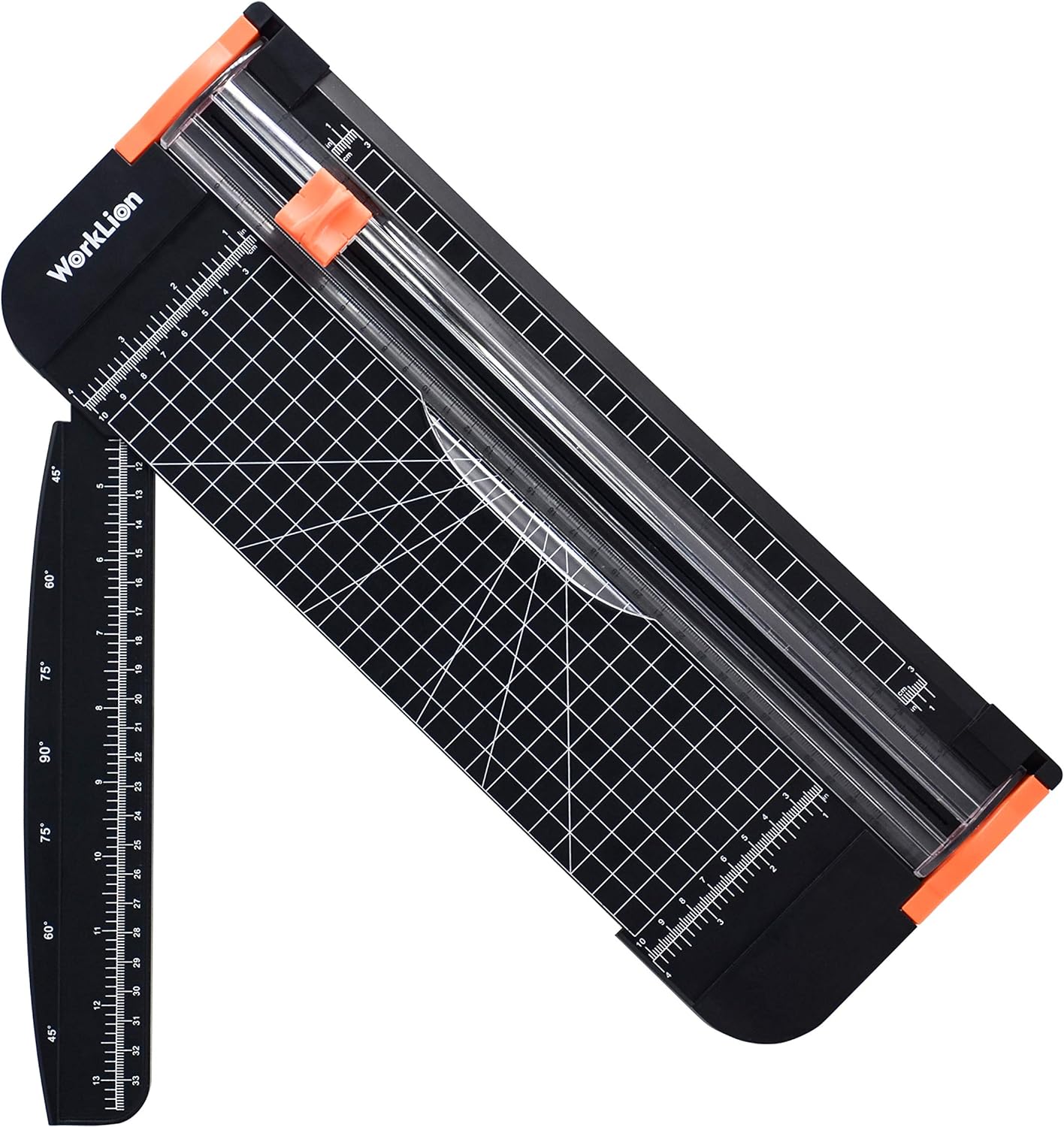 |
WORKLION Paper Cutter | Transparent guide ruler for clean, straight-line cutting. No-drag cutting action ensures smooth, accurate results. Sharp, hardened blade designed for long-lasting performance. Hidden blade mechanism activates only when pressed. |
Check Price |
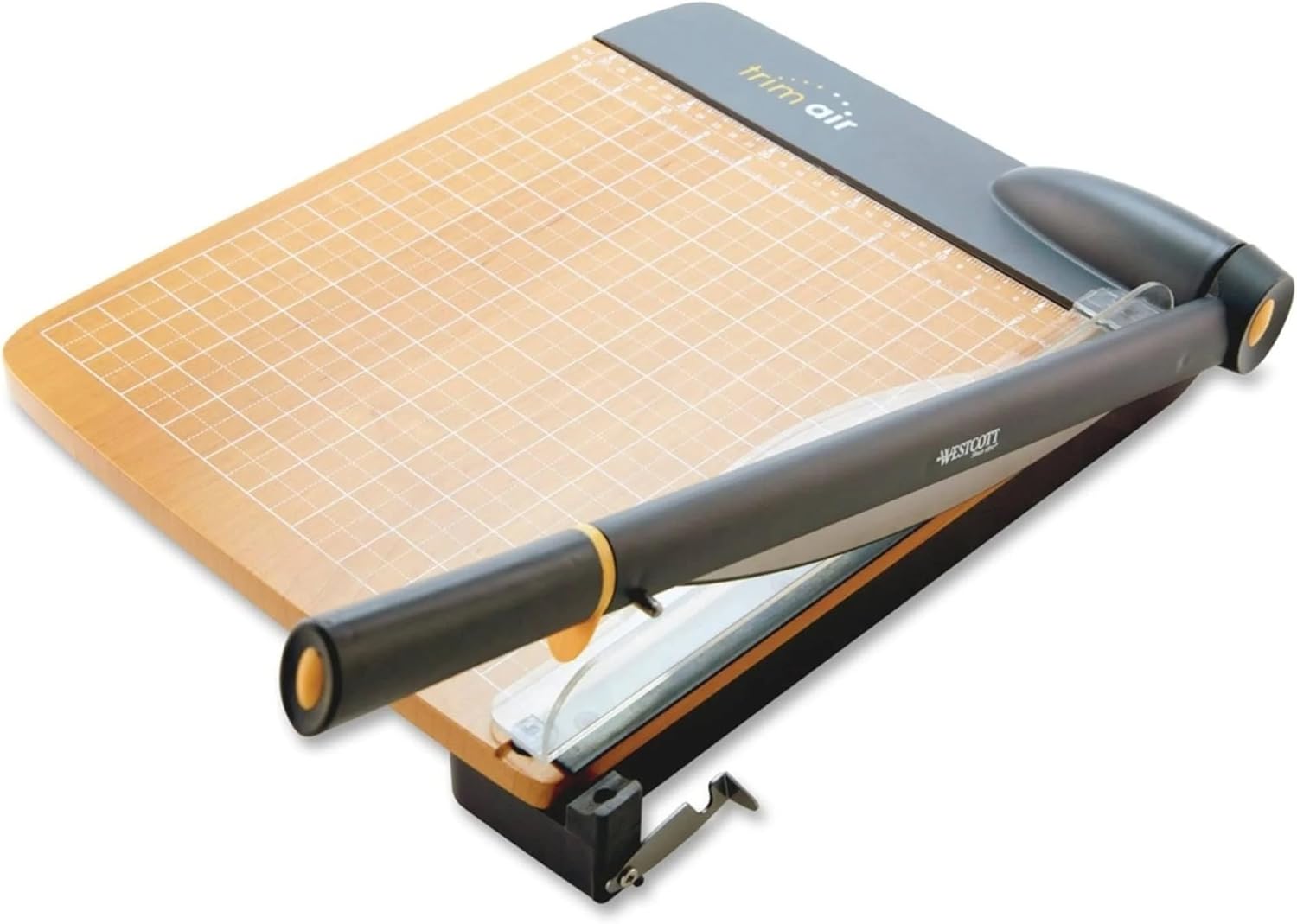 |
Westcott TrimAir Guillotine Paper Cutter | Titanium-bonded blade for premium cutting experience. Blade is 3× stronger than stainless steel for long-lasting sharpness. Soft ergonomic handle for comfortable grip. Designed for safe, fatigue-free cutting sessions. |
Check Price |
 |
Ecraft 12 x 12inch Paper Trimmer Cutter Score Board | Dual measurement system: Inches for trimming, centimeters for folding. Precision scoring and cutting for clean, accurate results. Guides every 1/16 inch for detailed alignment and spacing. Foldable design for compact, space-saving storage. Titanium blade included for durable, sharp cutting |
Check Price |
 |
CARL Professional Rotary Paper Trimmer 18 inch |
18-inch cutting length accommodates large formats. Cuts a variety of materials: mat board, cardstock, plastic sheets, paperboards. Premium carbide blade for precise, accurate cuts. Blade and rail system ensures clean, professional trimming. Calibrated metal base for enhanced stability and accuracy |
Check Price |
 |
Tim Holtz Mini Paper Cutter | Swing-style handle for smooth, controlled cutting. Extra-sharp stainless steel precision blade for clean edges. Cuts paper with straight, crisp edges every time. 3.5″ ruler with both inch and metric markings. Designed for 6.25″ cutting length and 3.5″ cut width |
Check Price |
 |
Swingline Guillotine Paper Cutter Heavy Duty | Effortless slicing through thick paper with minimal resistance. Precise alignment grid ensures straight cuts in one motion. Handles up to 10 sheets of paper at once for efficient trimming. 12″ cutting length suitable for large-format documents. Dual scale ruler with inch and centimeter markings |
Check Price |
 |
Ecraft 12″ Guillotine Paper Cutter | Laser-printed scale won’t fade over time. Magnetic paper guide ensures accurate alignment. Ergonomic handle design for smooth, effortless cutting. Blade-side finger guard protects hands during use. Sturdy steel base supports heavy use and long-term durability. |
Check Price |
What to Check Before You Choose a Trimmer
Decide whether you need portability or a permanently stable base
A sliding craft trimmer can disappear into a drawer and travel to a class. A wood- or metal-base guillotine is more comfortable when it stays on a worktable, because its larger footprint and mass help keep the sheet stable. A full 18-inch rotary trimmer takes even more space but gives long paper support and a fixed rail system that can be valuable for repeat work.
I know compact tools are attractive when a craft room is already crowded. The question is whether compactness forces you to balance half the sheet in mid-air. Measure the largest cardstock you use regularly and think about where both the kept piece and the offcut will sit during the cut.
Read capacity claims in the material they were tested with
Westcott states that its 12-inch TrimAir wood-base guillotine can slice through up to 30 sheets of 20 lb paper. Swingline rates the ClassicCut Lite at up to 10 sheets of 20 lb paper. WORKLION’s listing states up to 12 sheets of 70 gsm paper, while the Ecraft metal-base guillotine is listed for up to 15 sheets of copy paper. Those numbers are useful comparisons, but they are not direct promises for thick card stock.
For handmade cards, evaluate the cutter on the heaviest paper you actually use. Dense 110 lb cover stock, glitter card, laminated paper, or layered media can behave very differently from office paper. Use the maker’s stated limits as a ceiling, then reduce the stack when clean edges matter more than speed.
Check measurement markings against a ruler before a production run
Even a clearly printed grid should be verified when you first open a trimmer. Cut one strip at a familiar dimension, measure it with a separate ruler, rotate it, and check whether the opposite edge remains parallel. This quick test reveals whether you understand the true blade line and whether a guide is square to the cutting path.
If the tool has both inch and metric scales, choose one system for a project and stay with it. Mixing measurement systems halfway through a batch creates unnecessary rounding and makes repeated panel sizes harder to reproduce.
Think about replaceable blades and cutting mats
Sliding and rotary trimmers rely on replaceable wear parts. A small blade can eventually start pulling fibers rather than slicing them. Rotary trimmers may also use a cutting mat or strip beneath the blade; CARL notes that a deeply grooved mat can reduce cut quality and can be turned or replaced. A cutter with obtainable replacement parts can stay useful much longer than one that becomes disposable when the blade dulls.
Guillotine trimmers use a different system. Swingline describes its 12-inch ClassicCut Lite blade as self-sharpening, while Westcott emphasizes its titanium-bonded blade construction. Those designs reduce the routine blade-swapping typical of craft sliders, but you still need to keep the hinge and cutting path clean and avoid cutting materials the tool was not designed to handle.
Choose a layout that supports your most common card size
A2 cards, 5 x 7 cards, slimline formats, and square cards all create different trimming patterns. A full 12-inch sheet often needs to be cut down before scoring, which favors a platform that supports large craft paper. A mini cutter becomes much more useful later in the process when you are trimming sentiment strips, narrow mats, or photo-sized elements.
There is nothing wrong with eventually owning two cutters for different jobs. A large guillotine or rotary trimmer can handle card bases and batches, while a compact sliding or mini guillotine cutter stays within reach for small corrections. The mistake is expecting one very small tool to feel equally comfortable with every sheet size.
WORKLION Paper Cutter – Lightweight Sliding Control for Everyday Cardstock
The WORKLION Paper Cutter is a compact 12-inch sliding craft trimmer built around a transparent guide ruler and a press-activated hidden blade. Current listings describe it for A3, A4, and A5 paper, photos, cards, labels, cardstock, thin laminated sheets, and other lightweight craft materials. The maker’s listing also states a maximum of 12 sheets of 70 gsm paper, although card makers should use fewer sheets with heavier stock.
Its strongest advantage is that the cutting action is easy to see and easy to store. Instead of lifting an exposed guillotine arm, you align the paper beneath a narrow rail, press the blade carriage, and slide it along the track. For a crafter who trims one panel at a time, that can feel more controlled than a larger office cutter.
Features That Matter in Practice
The transparent guide ruler helps you watch the edge of the paper while the blade follows a straight path. That visibility is useful for patterned paper where you may be aligning a printed border rather than simply measuring from the edge. The sliding action also lets you stop after a short distance if you are making a partial cut for a flap or construction project, though partial cuts still require careful layout.
WORKLION’s hidden blade is designed to cut only when the carriage is pressed. This reduces exposed-blade contact during ordinary handling and makes the cutter easier to move or store than an open-blade guillotine. The trimmer also includes angle guidelines at 45, 60, and 75 degrees, which can help with tags, geometric panels, and decorative corners when you want more than a square cut.
Replacement of the small blade is part of normal ownership. When a sliding trimmer begins to fuzz cardstock, do not compensate by pressing harder and harder. A fresh blade and a lighter, consistent stroke usually protect the paper surface better than forcing a worn cutter through dense stock.
- The transparent guide ruler makes the cutting path easy to follow. That is useful when a patterned design or printed border matters as much as the numerical measurement.
- The blade stays hidden until the carriage is pressed. The enclosed design reduces accidental contact during storage and everyday handling.
- A 12-inch format covers common card-making sheet sizes without becoming a heavy desktop machine. It is easier to carry to a workshop than a wood- or steel-base guillotine.
- Angle guides at 45, 60, and 75 degrees add useful layout options. Tags, diagonal mats, and geometric paper pieces are easier to repeat than with freehand scissors.
- The blade is replaceable rather than making the entire trimmer disposable. That gives the tool a practical maintenance path once cutting quality starts to decline.
- Its stated 12-sheet capacity refers to light 70 gsm paper, not a stack of heavy card stock. For clean card bases, you will often cut one or a few heavier sheets at a time.
- The narrow lightweight base provides less physical support than a larger rotary or guillotine cutter. Long or stiff sheets may need your free hand to keep them flat and square.
Who It’s Best For
This WORKLION trimmer suits a card maker who values portability, visible alignment, and single-sheet precision more than batch capacity. It is especially useful for layered cards, tags, labels, and patterned paper that benefit from seeing exactly where the cut will travel.
Not Ideal For
It is less suitable if your normal workflow is cutting tall stacks of card bases or heavy board. A larger guillotine or professional rotary trimmer gives more support and more mechanical advantage for repeated dense cuts.
Westcott TrimAir Guillotine Paper Cutter – High-Capacity Cutting on a Wood Base
Westcott’s current 12-inch TrimAir model 15106 is a wood-base guillotine built around a titanium-bonded blade, safety guard, and ergonomic handle. Westcott states that it can cut up to 30 sheets of 20 lb paper at a time, making it the highest office-paper stack claim among the seven products in this article.
For card making, I would treat that capacity as evidence of a more substantial cutting mechanism rather than an invitation to stack thirty sheets of cover stock. The natural wood base provides a broad, stable platform, while the long arm gives more leverage than a compact slider. That combination is useful when you prepare multiple card blanks, inserts, or packaging pieces in a session.
Features That Matter in Practice
Westcott describes its titanium-bonded blade as three times stronger than classic stainless steel and designed to stay sharp through extended use. The real practical benefit is not the marketing comparison by itself; it is that the guillotine is intended for repeated, higher-volume trimming rather than occasional craft cuts. A long blade also completes a full 12-inch cut in one downward motion.
The fixed safety guard separates fingers from the blade path. This matters when you are holding a narrow strip near the cut line. The ergonomic handle gives you a larger gripping surface than a small sliding carriage, so repeated cuts are easier on the hand when a card-making session turns into batch production.
The trade-off is footprint. The wood base and long arm need permanent or semi-permanent workspace, and the cutter is not something most people will toss into a tote for a class. If your craft room has a dedicated cutting station, that stability is an advantage; if the dining table has to be cleared after every session, it becomes more awkward.
- The 12-inch guillotine uses a substantial titanium-bonded blade built for repeated cutting. It is better suited to batch preparation than a tiny craft-slider blade.
- Westcott rates it for up to 30 sheets of 20 lb paper. Even when you reduce that stack for heavy card stock, the mechanism has useful headroom for production-style cutting.
- The wood base gives full-sheet support and stability. Card bases stay flatter than they do on a very narrow portable trimmer.
- A safety guard creates a clear barrier beside the blade path. That is especially useful when trimming narrow margins and small offcuts.
- The long ergonomic handle provides mechanical leverage. Repeated cuts require less finger pressure than a small sliding cutter.
- The large wood base takes meaningful desk or shelf space. It is a poor match for a crafter who must pack everything away after every card.
- A guillotine arm is less convenient for tiny partial cuts or cutting into the middle of a sheet. It excels at complete straight trims rather than specialty construction cuts.
The Westcott TrimAir fits a card maker who regularly cuts batches of paper and has enough workspace to leave a larger guillotine ready to use. It is particularly useful for turning full sheets into repeated card bases, inserts, and mats where one decisive straight cut saves time.
Not Ideal For
It is not the best choice for travel, small desks, or a workflow dominated by tiny embellishments. A compact trimmer is easier to reach for when the job is trimming a sentiment by a few millimeters rather than dividing full sheets.
Ecraft 12 x 12-Inch Paper Trimmer Cutter Score Board – Cutting and Scoring in One Station
The Ecraft 12 x 12-inch Trim and Score Board combines a sliding paper cutter with a scoring surface and detachable scoring tool. Current retail information identifies a foldable 12 x 12-inch work area, guides at 1/16-inch intervals, inch and centimeter measurements, and a replaceable titanium blade. It is designed for cards, envelopes, boxes, coupons, photos, and general paper crafts.
That combination is especially relevant to card making because trimming and folding happen repeatedly in the same project. Instead of measuring a card blank on one cutter and carrying it to a separate score board, you can keep the sheet on one large craft surface. The board then folds for storage, which is useful because a rigid 12 x 12 scoring station otherwise occupies a large drawer or shelf.
Features That Matter in Practice
The 12 x 12 workspace supports standard scrapbook paper and common card stock sheets. The inch scale is useful for trimming, while the scoring side includes closely spaced channels and a detachable scoring tool. For card makers who build boxes and envelopes as well as folded cards, the ability to make a crease without changing tools can speed up layout work.
The foldable construction is a storage compromise. It lets a large surface close into a narrower footprint, but the joint means the board will never feel exactly like a single heavy metal plate. Before making a batch of scored card bases, open it fully, make sure the locking or support points are seated, and verify that the surface is flat.
Ecraft says the titanium cutting blade can be replaced when necessary. That is important because scoring channels encourage long-term use: the board may stay in your craft room for years even after the original cutter begins to dull. Replacing the cutting head is more sensible than abandoning a scoring surface you still use.
- Cutting and scoring share one 12 x 12-inch workspace. You can trim a card base and create its fold line without moving to a second board.
- The foldable surface reduces storage width. A full scrapbook-size work area is easier to fit into a craft cupboard after the session ends.
- Guides at 1/16-inch intervals support detailed card measurements. Small mats and layered borders are easier to plan than on a board with coarse markings.
- The titanium cutting blade is replaceable. The board does not have to be discarded simply because the cutting edge eventually wears.
- A detachable scoring tool is included. That makes the set useful for envelopes, boxes, and folded paper projects as well as flat trimming.
- The folding joint makes the board lighter and less monolithic than a solid metal cutter. Heavy downward pressure is not its natural strength.
- It is more complicated than a cutter-only tool. If you never score paper, much of the surface and channel system is unnecessary.
Who It’s Best For
This Ecraft board suits card makers who score almost every project and want one workspace for trimming, folding lines, envelopes, and small paper construction. It is particularly practical in a room where a separate 12-inch cutter and 12-inch scoring board would duplicate space.
Not Ideal For
It is less suitable if your main need is fast batch cutting through multiple sheets or if you already own a scoring system you prefer. In those cases, a dedicated cutter gives you a simpler work surface and often a stronger cutting mechanism.
CARL Professional Rotary Paper Trimmer 18 Inch – Long, Stable Cuts With a Replaceable Blade System
The CARL Professional 18-inch rotary trimmer corresponds to the RT-218 professional series. CARL lists an 18.18-inch cutting length, a calibrated metal base, a premium carbide rotary blade, and a straight-blade capacity of up to 10 sheets of 20 lb paper. The blade is encased in its holder, and the rail system is designed to keep the sheet controlled while the carriage moves.
For card making, eighteen inches is more length than a standard A2 card base requires, but the extra room can be valuable when working with scrapbook sheets, handmade paper, long slimline components, photo mats, or several related pieces that you want to align against one large base. The metal platform also makes the cutter feel more like a permanent studio tool than a travel trimmer.
Features That Matter in Practice
CARL’s rotary blade travels along a fixed rail rather than dropping through the paper in one guillotine motion. The blade is enclosed inside the carriage, which keeps the cutting edge away from fingers during normal use. You slide the material beneath the rail, hold or press the rail system as directed, and move the carriage through the sheet.
The carbide blade is replaceable, and the RT-218 works with a family of optional blade styles. CARL lists scoring, perforating, and several decorative edge blades for the professional series. That gives the trimmer a second life beyond simple straight cuts: invitations can be scored, ticket-style pieces perforated, or decorative edges added without buying an entirely separate machine.
The cutting mat beneath the blade is also replaceable and can be repositioned as the groove wears. This is an ownership detail that matters for accuracy. When a rotary blade begins dropping into a deep old groove, the edge can lose crispness even if the blade itself is still serviceable.
- The 18-inch cut length provides generous support for large craft paper. Scrapbook sheets and long card components fit more naturally than they do on a mini or 12-inch cutter.
- A calibrated metal base gives the trimmer a stable working surface. The sheet is less likely to flex or twist while you align a long cut.
- The premium carbide rotary blade is enclosed in its carriage. You get a controlled blade path without an exposed guillotine edge rising above the table.
- CARL supports replaceable straight, scoring, perforating, and decorative blades. The same platform can handle more than one paper-making operation as your projects expand.
- The cutting mat is a replaceable wear part. Restoring a worn cutting surface can bring back clean cuts without replacing the whole trimmer.
- An 18-inch metal-base trimmer occupies substantial workspace. It is more studio fixture than portable card-class tool.
- The 10-sheet rating is based on 20 lb paper. Dense card stock should be cut in smaller stacks, so the headline capacity matters less for heavy covers.
Who It’s Best For
The CARL RT-218 is well suited to a serious paper crafter who wants a long, stable rotary platform and likes the idea of changing blade functions later. It makes particular sense for card makers who also scrapbook, make invitations, cut photos, or work with longer paper formats.
Not Ideal For
It is excessive if you mainly trim small sentiment strips or need a cutter that travels easily. A lightweight 12-inch slider or the Tim Holtz mini cutter will be faster to pull out for tiny adjustments.
Tim Holtz Mini Paper Cutter – A Compact Guillotine for Small Card Components
The Tim Holtz 6.25-inch Mini Paper Trimmer from Tonic Studios is designed specifically for compact craft work. Tonic lists stainless-steel precision-ground blades, a 6.25-inch cut length, a 3.5-inch cutting width, a finger bar that helps keep material from moving, a ruler along the top edge, 0.25-inch grid lines, non-slip feet, and a locking mechanism for safe transport.
This is not a replacement for a full-sheet 12-inch cutter. Its strength is the opposite: it is small enough to live beside your stamping platform or die-cutting machine and handle the tiny trimming jobs that feel silly on a full-size guillotine. Sentiment panels, small photos, narrow mats, tags, and final edge corrections are where the design makes sense.
Features That Matter in Practice
The 6.25-inch cutting edge is long enough for many finished card components but short enough that the base stays compact. Tonic’s 0.25-inch molded grid and built-in ruler help with quick reference measurements. Because the sheet support is only 3.5 inches wide, larger paper needs another cutter first; the mini trimmer becomes most useful after a full sheet has already been reduced.
The finger bar serves two jobs: it helps keep paper stationary and adds separation between your hand and the precision-ground blades. The guillotine locks closed for transport, so the tool is practical for classes and workshops where a large trimmer would be awkward to carry.
The handle uses Tonic’s Kushgrip design, and non-slip feet help keep the base from walking during a downward cut. Those are small details, but a tiny guillotine would be frustrating if the whole tool slid every time you tried to remove a narrow strip.
- The 6.25-inch format is genuinely compact. It can stay within arm’s reach for trimming sentiments, mats, tags, and small card layers without dominating the desk.
- Precision-ground stainless-steel blades give the cutter a clean guillotine action. Small components can be squared without dragging a sliding blade through the paper.
- The finger bar helps hold paper while keeping hands away from the blade path. That improves both control and safety on narrow pieces.
- The trimmer locks closed and has non-slip feet. It is easy to carry to workshops and more stable in use than its small footprint might suggest.
- The molded grid and built-in ruler support fast repeat measurements. Common small card pieces can be aligned without setting up a separate ruler each time.
- The 6.25-inch cutting length and 3.5-inch width are intentionally limited. Full letter-size or 12-inch craft sheets need to be cut down elsewhere first.
- A tiny base gives little support to wide pieces that overhang the platform. It works best when the entire card component fits comfortably on the tool.
Who It’s Best For
The Tim Holtz Mini Trimmer is for card makers who already work with small panels and want a fast desktop guillotine for final sizing. It is especially useful for classes, travel kits, and crowded workspaces where a compact cutter can remain accessible all day.
Not Ideal For
It is not suitable as the only trimmer if you routinely start with 8.5 x 11 or 12 x 12 sheets. The limited platform is a feature for small work, but it becomes a hard restriction for full-size card-base preparation.
Swingline ClassicCut Lite Guillotine – Straightforward 12-Inch Cutting With a Lightweight Base
The source article’s Swingline entry matches the ClassicCut Lite 9312, a 12-inch guillotine rated by Swingline for up to 10 sheets of 20 lb paper. The current model uses a self-sharpening blade, alignment grid, dual-scale ruler, lightweight plastic base with non-slip rubber feet, easy-grip handle, fixed guard rail, and a latch that locks the arm down for storage.
This is an office-style cutter that adapts well to straightforward card-making tasks. It does not offer scoring channels, specialty rotary blades, or the mass of a wood-base professional trimmer. What it offers is a familiar full-length guillotine cut on a base that is light enough to move around the room.
Features That Matter in Practice
The self-sharpening 12-inch blade allows a complete card-stock cut in one motion, while the alignment grid and inch/metric ruler provide the basic references needed for square pieces. Swingline’s guard rail is fixed in place and keeps hands separated from the blade; the company notes that this guard also limits the recommended maximum paper size to 8.5 x 11 inches, even though the blade itself is 12 inches long.
The lightweight plastic base is a useful contrast to Westcott’s wood base and Ecraft’s steel base. It is easier to move, but it depends more on its non-slip feet and your hand pressure for stability. That can be a good compromise in a multipurpose room where the trimmer comes out for a project and then returns to storage.
The arm latch matters if the cutter is stored upright or carried. A guillotine that cannot lock closed is much more awkward in a shared craft area. Here, the latch gives the blade a defined storage position rather than leaving the arm free to rise.
- The 12-inch self-sharpening guillotine blade gives quick full-length cuts. Card bases can be divided in one decisive motion rather than several passes.
- Swingline rates the cutter for up to 10 sheets of 20 lb paper. It has useful capacity for ordinary paper batches while remaining manageable for craft use.
- The alignment grid and dual-scale ruler are simple and easy to read. You can work in inches or centimeters without adding a separate measuring mat.
- The fixed guard rail and blade latch address both cutting and storage safety. The arm has a secure closed position when the trimmer is not in use.
- A lightweight plastic base with non-slip feet is easy to relocate. It suits a craft space that has to share a table with other tools.
- The lightweight plastic base is less substantial than wood or steel alternatives. Heavy stock and long sessions can benefit from a heavier platform.
- The fixed guard rail limits the recommended sheet size to 8.5 x 11 inches. Crafters who work heavily with 12 x 12 scrapbook paper may prefer another layout.
Who It’s Best For
The Swingline ClassicCut Lite works for card makers who want a familiar 12-inch guillotine without the weight and permanent footprint of a professional metal or wood-base cutter. It is a sensible fit for letter-size card stock, office paper, photos, and routine straight cuts.
Not Ideal For
It is less suitable if you rely on 12 x 12 craft paper, need a heavy base for production, or want scoring and decorative blade options. Those needs point more toward the Ecraft scoring board or CARL rotary system.
Ecraft 12-Inch Guillotine Paper Cutter – Steel-Base Stability With a Magnetic Guide
Ecraft’s 12-inch guillotine cutter, identified by current listings under ASIN B0CB5P4HNT, uses a heavy-duty metal base, magnetic paper guide, safety guard, metric and imperial scales, and an ergonomic cutting handle. Ecraft states a capacity of up to 15 sheets of copy paper and lists the tool for card stock, cardboard, vinyl, photos, labels, and general craft trimming.
The most interesting feature for card work is the movable magnetic guide. Instead of relying only on your fingertips to keep every sheet at the same measurement, you can position the guide as a physical reference. That can speed up repeated cuts when you are preparing several identical mats or inserts.
Features That Matter in Practice
The steel base gives the cutter more mass than a typical portable plastic guillotine. That helps resist movement while the arm comes down. The base carries both metric and imperial scales; current listing copy says the markings are laser printed to resist fading, which is useful for a tool that may be wiped frequently after paper dust and adhesive-backed materials.
The magnetic paper guide can act as a repeat stop as long as it is positioned squarely and the sheet is held against it consistently. This is valuable for production card making because repeated panels are often more important than one-off maximum capacity. If you need twenty identical 4-inch layers, a reliable physical reference saves time and reduces cumulative measuring errors.
The blade-side finger guard is also intended to press material down near the cut, reducing sheet movement as the blade passes. Like any guillotine, it should be operated with fingers outside the guarded zone and the blade fully lowered or secured before reaching for small offcuts.
- The metal base gives the guillotine a stable platform for repeated craft cuts. It feels more planted than lightweight plastic cutters when dense stock is being trimmed.
- A movable magnetic guide can speed up repeated dimensions. Multiple card mats or inserts can reference the same stop instead of being measured from scratch each time.
- Ecraft lists a 15-sheet copy-paper capacity. The mechanism has useful headroom even though heavy card stock should be cut in smaller stacks.
- Metric and imperial scales are printed on the base. You can use the same cutter for US card dimensions and metric paper formats without conversion.
- The safety guard helps keep material down close to the blade while separating fingers from the cut. That supports both accuracy and safer handling.
- The metal base is heavier and less travel-friendly than a sliding craft trimmer. It makes more sense at a dedicated or semi-permanent cutting station.
- The 15-sheet figure applies to copy paper rather than thick cover stock. Pushing a dense stack to the headline number can reduce cut quality.
Who It’s Best For
The Ecraft steel-base guillotine suits a card maker who wants a sturdier 12-inch cutter and makes repeated panels, inserts, or card blanks. The magnetic guide is particularly useful when consistency across a batch matters more than portability.
Not Ideal For
It is not the best option for travel classes, very small desks, or a workflow built around scoring and decorative blade changes. Those needs are handled more naturally by the compact trimmers or the Ecraft trim-and-score board.
How the Seven Paper Trimmers Compare
These trimmers become easier to choose when you separate them by working style. WORKLION is a portable sliding cutter. Westcott, Swingline, and the steel-base Ecraft are guillotines with different levels of mass and capacity. The Ecraft 12 x 12 board combines trimming with scoring. CARL is a longer professional rotary platform with replaceable blade functions. Tim Holtz is intentionally miniature and works best after the main sheet has already been cut down.
For single-sheet card layers and portable crafting
WORKLION is the most conventional portable craft trimmer here. Its hidden sliding blade, transparent guide, and angle marks make it useful for controlled one-off cuts. It travels more easily than the large guillotines and gives you a clear view of the paper beneath the rail.
The Tim Holtz Mini Trimmer is even smaller, but it serves a later stage of the workflow. It is excellent for sentiment strips and small panels, yet its 6.25-inch cut length means it cannot replace WORKLION for many full-sheet tasks. If you attend classes, the two designs solve different portability problems: WORKLION for broader paper preparation and Tim Holtz for tabletop finishing cuts.
For batches of card bases and repeated straight cuts
Westcott gives you the strongest published office-paper capacity in this group, up to 30 sheets of 20 lb paper, along with a large wood base and long handle. It is the most convincing choice when the cutter will stay set up and you frequently divide paper in batches. The steel-base Ecraft is a useful alternative when a magnetic repeat guide matters more than maximum stated stack size.
Swingline sits between portability and stability. Its base is lighter than Westcott or Ecraft steel, but you still get a full 12-inch guillotine, a self-sharpening blade, guard rail, and 10-sheet office-paper rating. It makes sense for someone who wants guillotine speed but moves the cutter in and out of storage regularly.
For cutting and scoring from the same surface
The Ecraft 12 x 12 Trim and Score Board is the obvious fit if scoring is part of nearly every card. It is not trying to be the strongest stack cutter. Its value comes from keeping the cutting ruler, scoring grooves, and large craft-paper surface together, then folding the board for storage when the session ends.
If you already own a scoring board you love, that advantage disappears. In that case, the same desk space might be better spent on a stronger cutter with a more rigid base.
For long sheets and replaceable specialty blades
CARL’s RT-218 is the most expandable cutting platform here. The 18-inch metal base supports long material, while the professional rotary system accepts additional blade styles and a replaceable cutting mat. Card makers who also scrapbook, make invitations, or perforate paper can get more use from that ecosystem than from a fixed guillotine.
The trade-off is size and maintenance. A large rotary trimmer needs permanent storage, and both blade and cutting mat are consumables. It rewards people who use the platform regularly rather than someone who trims two cards a month.
For the smallest workbench
If every inch of the desk matters, the Tim Holtz Mini Trimmer is easiest to leave out. WORKLION is the next most compact full-length option. The folding Ecraft board can store surprisingly well for a 12 x 12 workspace, but it still needs room to open fully while you are scoring or trimming.
How to Get Square, Repeatable Cuts for Handmade Cards
1. Verify the cutter before using expensive paper
Use a sheet of inexpensive paper to cut a known rectangle. Measure both ends of the cut and compare the diagonals if squareness is critical. This first test tells you where the true blade line sits relative to the printed grid and whether you are holding the sheet consistently. Then repeat the test with one piece of the actual card stock, because dense paper can behave differently from copy paper.
2. Establish one factory edge as your reference
Start from the straightest existing edge of the sheet. Place that edge against the trimmer’s square reference, magnetic guide, or ruler stop. After the first cut, rotate the sheet so the newly cut edge becomes the reference for the next dimension. This prevents a small original manufacturing skew from being copied into every side of the card base.
3. Support the entire sheet before you align it
Do not let a large 12 x 12 sheet sag off a narrow trimmer and then measure from the lifted edge. Add a same-height book or support beside a compact base if necessary, or use a larger platform such as the CARL or scoring board. The paper should lie flat while you decide where the cut will land.
4. Hold the paper, not the offcut, during the cut
Keep the piece you want to preserve stable against the guide. Allow the waste side to separate naturally. Pulling the offcut can steer the paper into the blade path and produce a tapered edge, especially on sliding trimmers where the cut happens over a longer motion.
5. Use one smooth cutting motion
For sliding and rotary trimmers, move the carriage through the sheet with consistent pressure rather than sawing back and forth repeatedly. For guillotines, lower the arm in one controlled stroke. If the blade stalls, stop and reduce the stack rather than jerking the cutter through the material.
6. Cut repeated panels against a physical stop when available
If the trimmer has a magnetic guide or a reliable fixed reference, set it once for repeated layers. Make one test panel, confirm the dimension, then use the same stop for the batch. This is faster and usually more consistent than reading the ruler twenty times.
7. Score after trimming the card base to final width
A fold is easiest to position when the blank already has its finished outside dimensions. On the Ecraft score board, align the trimmed blank and use the scoring tool in the correct groove. With another system, move the finished blank to your preferred scoring tool. Keep cutting blades and scoring actions separate so the fold remains strong.
8. Check the first folded card before cutting the whole batch
Fold and inspect one completed blank. Confirm that the edges meet, the card sits flat, and the finished size fits the envelope. If the first piece is off by even a small amount, correct the guide before you create a stack of identical errors.
Keeping a Paper Trimmer Accurate Over Time
Replace small sliding blades before they start tearing fibers
A worn craft blade often announces itself through fuzzy edges, increased drag, and the need to press harder. Replace it rather than accepting rough cuts and sanding them with scissors afterward. Keep spare blades in their packaging so the edges are not damaged in a loose tool drawer.
Rotate or replace a worn rotary cutting mat
CARL notes that a deep groove in the cutting mat can interfere with clean cutting. Many rotary mats can use more than one surface or orientation before they need replacement. If a fresh blade still leaves an uneven section in the same place on every cut, inspect the mat beneath it.
Keep guillotine hinges and bases free of paper debris
Fine paper dust, adhesive residue, vinyl scraps, and loose fibers can collect near the blade and hinge. Wipe the base with the blade secured and follow the maker’s maintenance guidance. Do not oil or sharpen a guillotine casually unless the manufacturer specifically instructs you to do so; the alignment of the blade against its cutting edge matters.
Check movable guides before a batch
A magnetic or sliding stop is only useful when it is square. Before making dozens of identical mats, press one sheet against the guide, make a cut, and measure both ends. If the guide was bumped during storage, this thirty-second test can save a large amount of card stock.
Store cutters with blades secured
Lock guillotine arms down when a latch is provided, and park rotary or sliding carriages according to the maker’s instructions. Do not store heavy objects on top of a flexible scoring board or narrow slider. The tool stays accurate when the base remains flat and the rail is not twisted under weight.
Where Card Makers Most Often Lose Cutting Accuracy
Trusting the printed ruler without a first-cut check
A printed grid can be clear and still require you to understand exactly which side of a line the blade removes. Test a known dimension first. Once you know the relationship between the grid and the cut, use the same visual reference throughout the project instead of changing from line center to line edge.
Trying to cut too much heavy stock at once
Sheet-capacity numbers encourage people to stack card stock until the arm becomes difficult to move. Heavy paper compresses differently from copy paper, and the lower sheets can shift. Cut smaller stacks when edge quality matters. The extra minute is cheaper than remaking an entire set of invitations.
Letting the sheet hang unsupported
A long piece of paper hanging off the side of a compact cutter acts like a lever. As it sags, it can pull the measured edge away from the guide. Support the sheet at the same height as the base or switch to a trimmer with a broader platform for large-format paper.
Using a dull blade as if more pressure will solve the problem
More pressure on a dull slider can crush or tear fibers before the edge finally separates. A worn rotary blade can also force you to make repeated passes that widen the cut. Replace the consumable part when the cut changes character; do not normalize increasing force as the tool ages.
Measuring every piece separately when a repeat stop is available
Repeated reading creates repeated opportunities for error. If your Ecraft guillotine’s magnetic guide or another reliable stop can hold the dimension, use it after verifying the first cut. Production work becomes faster and more consistent when the measurement is set once and the paper is simply seated against the same reference.
Trimming tiny slivers with fingers too close to a guillotine blade
A narrow correction is sometimes better made on a covered sliding or rotary cutter than on a large open-arm guillotine. If the piece cannot be held securely outside the guard area, choose another tool or redesign the cut. No card edge is worth placing fingertips in the cutting path.
Safety Notes for Paper Trimmers
Keep hands outside the cutting path even when a guard is present
A safety guard reduces access to the blade; it does not make the blade harmless. Hold paper on the safe side of the guard and use the built-in paper bar, clamp, or guide where provided. Retrieve small scraps only after the blade is down and secure.
Lock guillotine arms before moving or storing the cutter
Swingline and Tim Holtz provide blade-locking mechanisms, and other guillotines should be stored according to their own safety design. Carry a cutter by its base or designated handle area, not by an unlocked cutting arm. Store it where children cannot lift or play with the blade mechanism.
Do not exceed the material limits stated for the tool
Paper cutters are not general-purpose shop shears. Thick plastic, metal foil, dense board, layered adhesive materials, and other media can damage a blade or cause a piece to shift unexpectedly. If the maker does not list the material, use a tool designed for it rather than experimenting with extra force.
Treat replacement blades as sharp tools from the moment the package opens
Sliding and rotary replacement blades may look small, but their edges are designed to cut paper cleanly with very little contact area. Follow the replacement procedure, hold only the designated housing or safe surfaces, and dispose of worn blades in a container that cannot be punctured easily.
Frequently Asked Questions
Is a guillotine or sliding trimmer better for card making?
A sliding trimmer is convenient for careful single-sheet work, travel, and visible alignment. A guillotine is faster for repeated straight cuts and generally offers more leverage. Many card makers prefer a compact slider for detailed layers and a guillotine for preparing card bases in batches.
Can these trimmers cut 110 lb card stock?
Several can cut heavy stock one sheet at a time, but the published sheet capacities in this article are generally based on much lighter copy paper. Dense cover stock should be tested conservatively. If the cutter requires excessive force or leaves a crushed edge, reduce the stack immediately.
Which trimmer is most useful if I also need to score card bases?
The Ecraft 12 x 12 Trim and Score Board is the most direct all-in-one option because it includes scoring channels and a separate scoring tool. CARL’s professional rotary system also supports an optional scoring blade, but that is a replaceable accessory rather than a built-in score-board surface.
Why does my paper trimmer leave fuzzy edges?
The blade may be dull, the rotary cutting mat may be deeply grooved, the stack may be too thick, or the paper may be shifting during the cut. Start with one sheet and a fresh or known-good blade. If the problem happens in the same place along a rotary cut, inspect the cutting mat as well.
Do I need an 18-inch trimmer for card making?
Not for ordinary A2 or 5 x 7 cards. The CARL 18-inch model becomes useful when you also work with scrapbook paper, long invitations, oversized artwork, or want the stability and replaceable specialty-blade system of a larger rotary platform. For only small cards, the extra length may be unused desk space.
Is the Tim Holtz Mini Trimmer large enough to be my only cutter?
Usually not if you begin with full letter-size or 12 x 12 sheets. Its 6.25-inch cut length and 3.5-inch cutting width are designed for smaller pieces. It works best as a finishing cutter or as the primary cutter for people whose work is already pre-cut to small formats.
How can I make repeated card layers exactly the same size?
Use a physical stop or guide when the trimmer provides one, verify the first piece with a separate ruler, and keep the same sheet edge against the reference. Do not re-read a ruler for every piece if you can lock or position a repeat guide once. Consistency comes from removing decisions from the batch process.
Should I cut several sheets at once to save time?
Only when the material, cutter, and required finish support it. For ordinary inserts and thin paper, a small stack can be efficient. For expensive or heavy card stock, single-sheet or very small-stack cutting often produces straighter, cleaner edges and reduces the chance that the bottom pieces shift.
Choose the Trimmer That Matches the Cuts You Repeat
The best paper trimmer for card making is the one that stays square on the work you actually do. WORKLION offers a portable sliding system with a visible guide and covered blade. Westcott brings higher-capacity guillotine cutting on a stable wood base. The Ecraft 12 x 12 board is the practical cut-and-score choice, while CARL provides the longest, most expandable rotary platform. Tim Holtz specializes in small finishing cuts, Swingline balances a full 12-inch guillotine with a lightweight base, and Ecraft’s steel-base guillotine adds a magnetic guide for repeated dimensions.
I don’t think the most powerful cutter is automatically the most useful one for a card maker. A heavy guillotine can be excellent for card-base batches and still feel clumsy when you only need to shave a sixteenth of an inch from a sentiment. A tiny mini cutter can make that adjustment beautifully and still be the wrong tool for dividing a full sheet. The right trimmer is the one whose base, blade path, and measuring system fit the stage of card making you perform most often.
Before committing to a large batch, make one measured test cut on your actual stock, fold one finished card, and check how the edges meet. Then compare the seven options above against your paper sizes, scoring needs, workspace, and preferred cutting volume. That simple process will tell you more than a maximum-sheet claim ever can.